# Reports & Queries

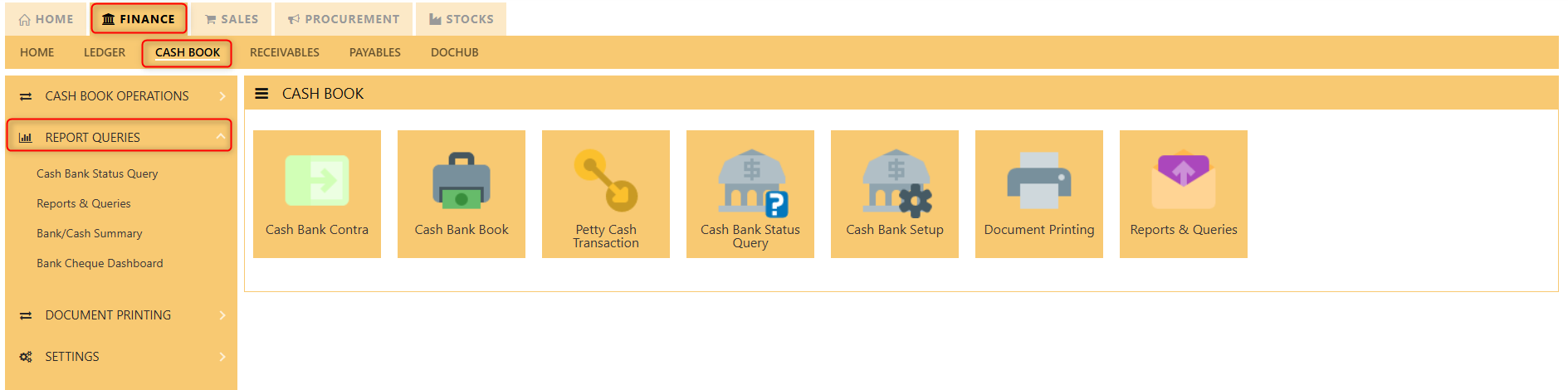
##### This is where all the bank/cash reports such as the cash bank status query, bank/cash summary and bank cheque dashboard. The available reports in the Reports/Queries also have the capability to be exported to Microsoft Word, Excel and PDF. Users can filter the reports according to whether it is a bank or cash and their preferred time period.

[![image.png](https://doc.uniq365.com/uploads/images/gallery/2025-01/scaled-1680-/pYFimage.png)](https://doc.uniq365.com/uploads/images/gallery/2025-01/pYFimage.png)
<details id="bkmrk-cash-bank-status-que"><summary>Cash Bank Status Query</summary>

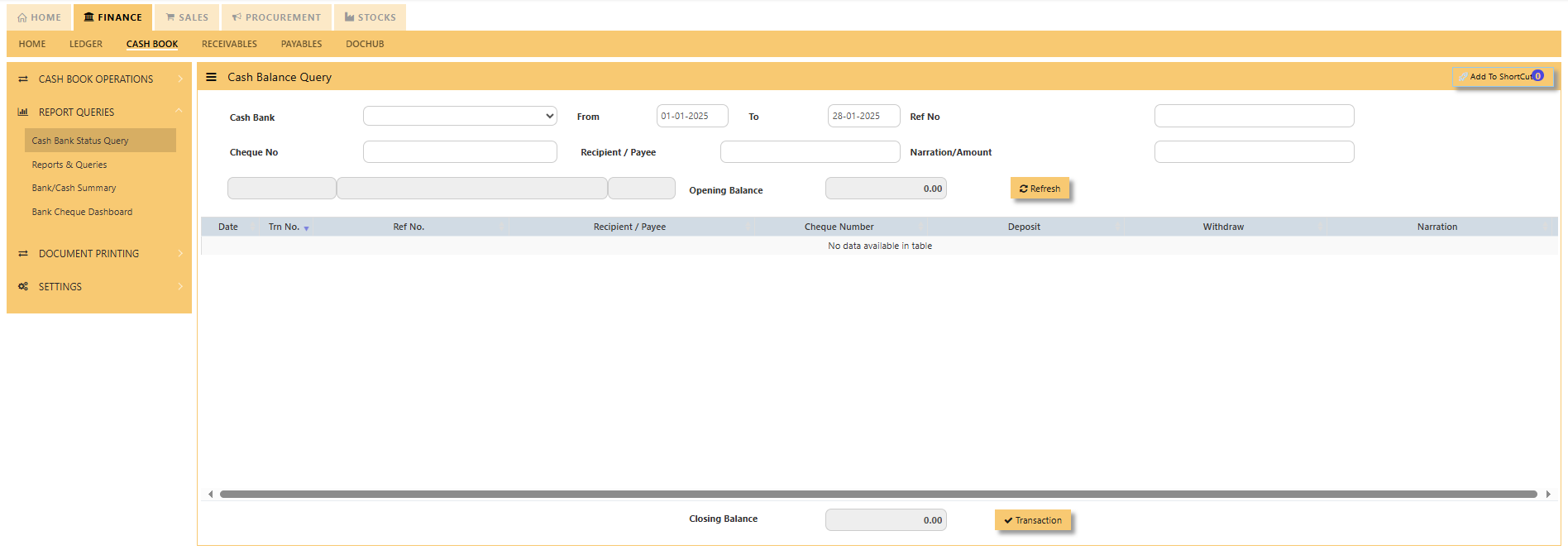
<span lang="EN-US" style="font-size: 12.0pt; font-family: 'Segoe UI','sans-serif';">Click <span style="mso-bidi-font-weight: bold;">on **Cash Bank Book – Report &amp; Queries – Cash Bank Status Query** icon for the following screen.</span></span>

[![image.png](https://doc.uniq365.com/uploads/images/gallery/2025-01/scaled-1680-/lPnimage.png)](https://doc.uniq365.com/uploads/images/gallery/2025-01/lPnimage.png)

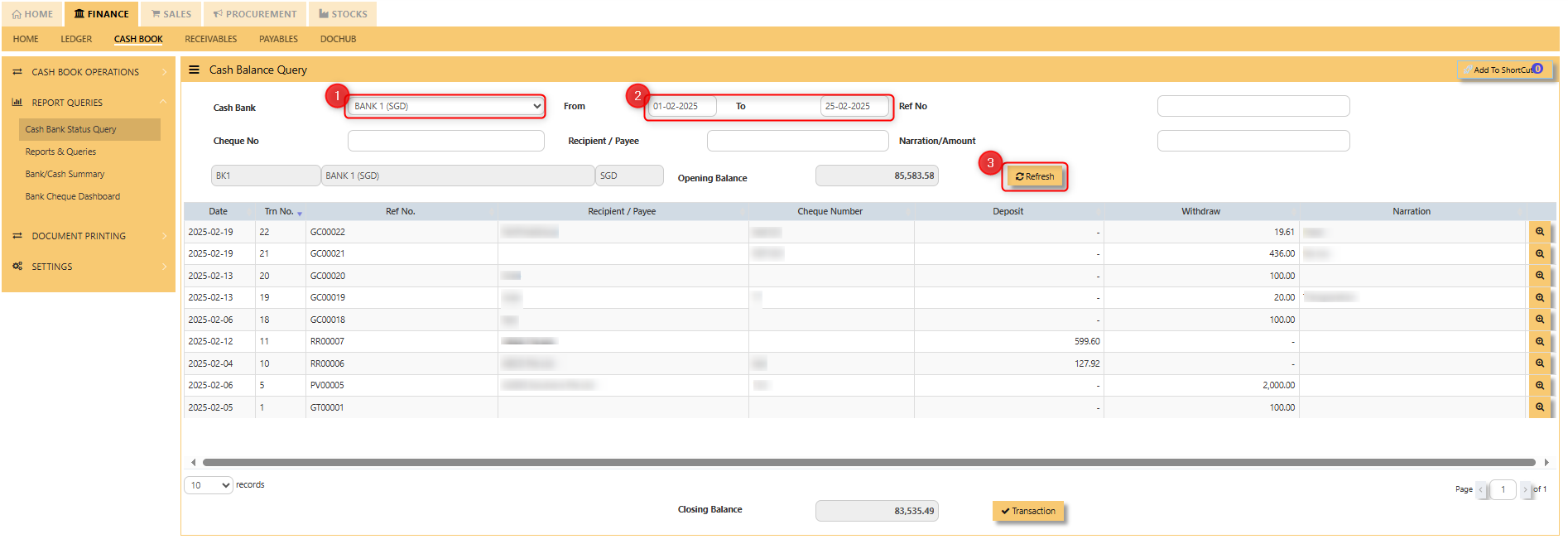
<span style="color: rgb(0, 0, 0);"><span lang="EN-US" style="font-size: 12pt; font-family: 'Segoe UI', 'sans-serif';">To use the bank status query:  
</span><span lang="EN-US" style="font-size: 12pt; font-family: 'Segoe UI', 'sans-serif';">1. Choose the respective Cash Bank Code from the dropdown.  
</span><span lang="EN-US" style="font-size: 12pt; font-family: 'Segoe UI', 'sans-serif';">2. Select the inclusive dates of transactions.  
3\. Once you hit "**REFRESH**", the transaction for the cash bank code will appear. This</span><span lang="EN-US" style="font-size: 12pt; font-family: 'Segoe UI', 'sans-serif';"> dashboard will show you all the individual cash or bank code, from the dates inclusive in the from and to dates as well as the opening balance as shown below.</span></span>

[![image.png](https://doc.uniq365.com/uploads/images/gallery/2025-02/scaled-1680-/R4mimage.png)](https://doc.uniq365.com/uploads/images/gallery/2025-02/R4mimage.png)

</details><details id="bkmrk-reports-%26-queries-%C2%A0"><summary>Reports &amp; Queries</summary>

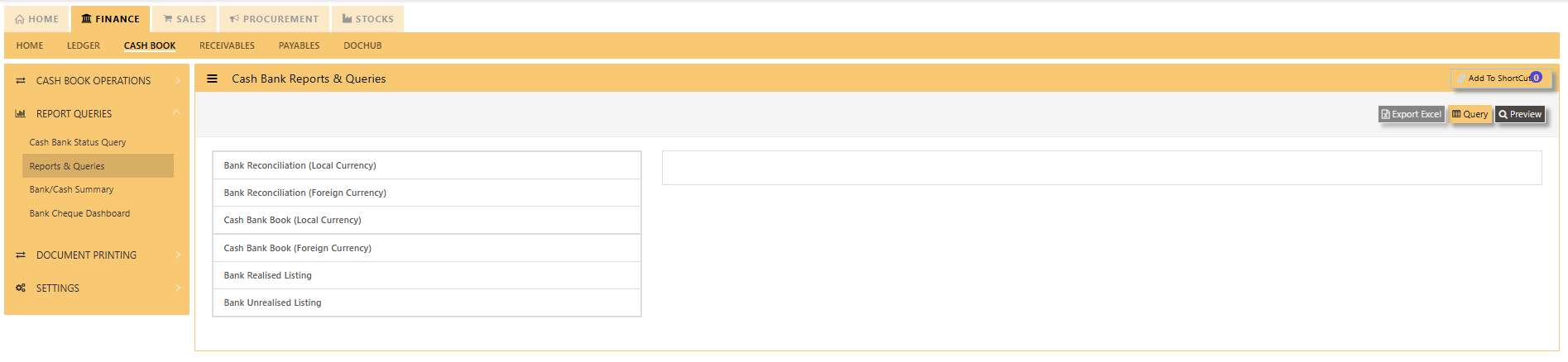
<span lang="EN-US" style="font-size: 12pt; font-family: 'Segoe UI', 'sans-serif'; color: rgb(0, 0, 0);">Click <span style="mso-bidi-font-weight: bold;">on **Cash Bank Book – Reports &amp; Queries – Reports &amp; Queries** icon for the following screen.</span></span>

<span style="color: rgb(0, 0, 0);">[![image.png](https://doc.uniq365.com/uploads/images/gallery/2025-01/scaled-1680-/XN2image.png)](https://doc.uniq365.com/uploads/images/gallery/2025-01/XN2image.png)</span>

<span lang="EN-US" style="font-size: 12pt; font-family: 'Segoe UI', 'sans-serif'; color: rgb(0, 0, 0);"><span lang="EN-US" style="font-size: 12.0pt; font-family: 'Segoe UI','sans-serif'; mso-fareast-font-family: 'Times New Roman'; mso-ansi-language: EN-US; mso-fareast-language: ZH-CN; mso-bidi-language: AR-SA;">These reports may be sent to a previewed to print, click on to Preview. </span>You may seek an individual report, and the following data can in turn be drilled down to transaction level<span style="mso-spacerun: yes;">.</span></span>

- <span lang="EN-US" style="font-family: 'Segoe UI', 'sans-serif'; color: rgb(0, 0, 0);">Mater Listing – Currency Rates</span>
- <span style="color: rgb(0, 0, 0);"><span lang="EN-US" style="font-family: 'Segoe UI','sans-serif';">Bank Reconciliation (Local Currency)</span></span>
- <span style="color: rgb(0, 0, 0);"><span lang="EN-US" style="font-family: Symbol; mso-fareast-font-family: Symbol; mso-bidi-font-family: Symbol;"><span style="mso-list: Ignore;"><span style="font: 7.0pt 'Times New Roman';"> </span></span></span><span lang="EN-US" style="font-family: 'Segoe UI','sans-serif';">Bank Reconciliation (Foreign Currency)</span></span>
- <span style="color: rgb(0, 0, 0);"><span lang="EN-US" style="font-family: Symbol; mso-fareast-font-family: Symbol; mso-bidi-font-family: Symbol;"><span style="mso-list: Ignore;"><span style="font: 7.0pt 'Times New Roman';"> </span></span></span><span lang="EN-US" style="font-family: 'Segoe UI','sans-serif';">Cash Bank Book (Local Currency) </span></span>
- <span style="color: rgb(0, 0, 0);"><span lang="EN-US" style="font-family: Symbol; mso-fareast-font-family: Symbol; mso-bidi-font-family: Symbol;"><span style="mso-list: Ignore;"><span style="font: 7.0pt 'Times New Roman';"> </span></span></span><span lang="EN-US" style="font-family: 'Segoe UI','sans-serif';">Cash Bank Book (Foreign Currency)</span></span>
- <span style="color: rgb(0, 0, 0);"><span lang="EN-US" style="font-family: Symbol; mso-fareast-font-family: Symbol; mso-bidi-font-family: Symbol;"><span style="mso-list: Ignore;"><span style="font: 7.0pt 'Times New Roman';"> </span></span></span><span lang="EN-US" style="font-family: 'Segoe UI','sans-serif';">Bank Realized Listing</span></span>
- <span style="color: rgb(0, 0, 0);"><span lang="EN-US" style="font-family: Symbol; mso-fareast-font-family: Symbol; mso-bidi-font-family: Symbol;"><span style="mso-list: Ignore;"><span style="font: 7.0pt 'Times New Roman';"> </span></span></span><span lang="EN-US" style="font-family: 'Segoe UI','sans-serif';">Bank Unrealized listing</span></span>
- <span style="color: rgb(0, 0, 0);"><span lang="EN-US" style="font-family: Symbol; mso-fareast-font-family: Symbol; mso-bidi-font-family: Symbol;"><span style="mso-list: Ignore;"><span style="font: 7.0pt 'Times New Roman';"> </span></span></span><span lang="EN-US" style="font-family: 'Segoe UI','sans-serif';">Cheque Deposit listing  
    </span></span>

<span lang="EN-US" style="font-family: 'Segoe UI','sans-serif';"> </span>

</details><details id="bkmrk-bank%2Fcash-summary-%C2%A0"><summary>Bank/Cash Summary</summary>

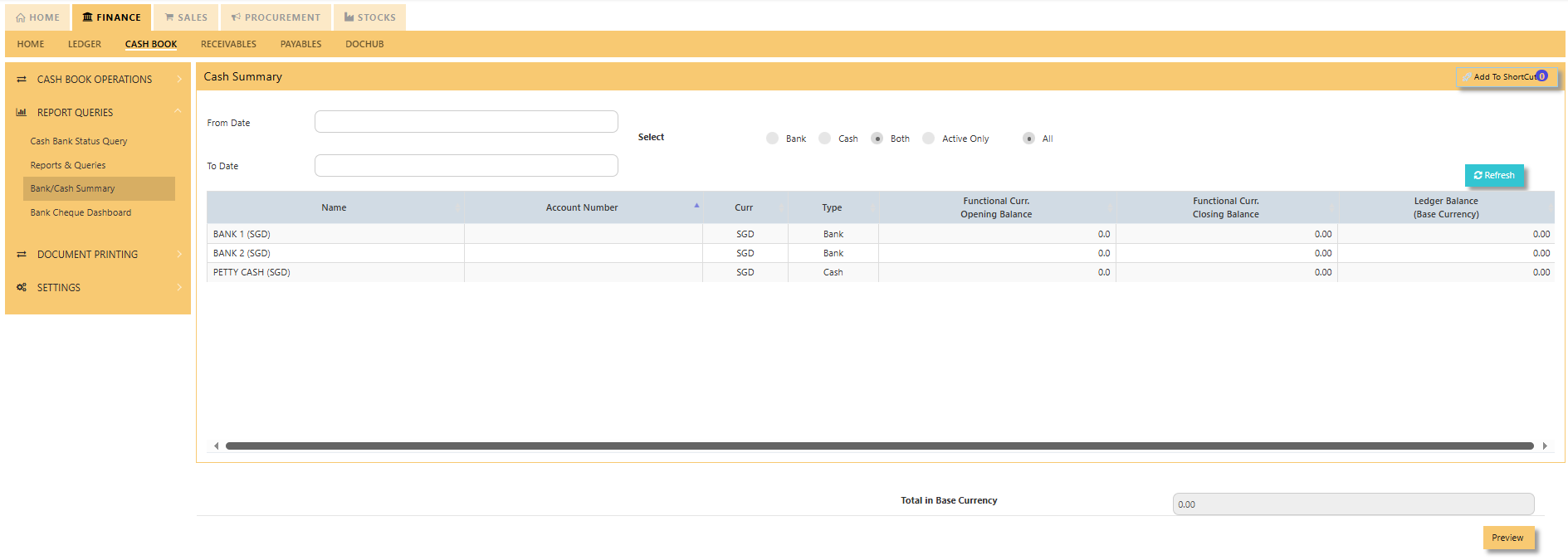
<span style="color: rgb(0, 0, 0);">Click on **Cash Bank Book – Reports &amp; Queries – Bank/Cash Summary<span lang="EN-US" style="font-size: 12.0pt; font-family: 'Segoe UI','sans-serif';"><span style="mso-bidi-font-weight: bold;"> </span></span>**<span lang="EN-US" style="font-size: 12.0pt; font-family: 'Segoe UI','sans-serif';"><span style="mso-bidi-font-weight: bold;">for the following screen.</span></span></span>

<span style="color: rgb(0, 0, 0);">[![image.png](https://doc.uniq365.com/uploads/images/gallery/2025-01/scaled-1680-/QuMimage.png)](https://doc.uniq365.com/uploads/images/gallery/2025-01/QuMimage.png)</span>

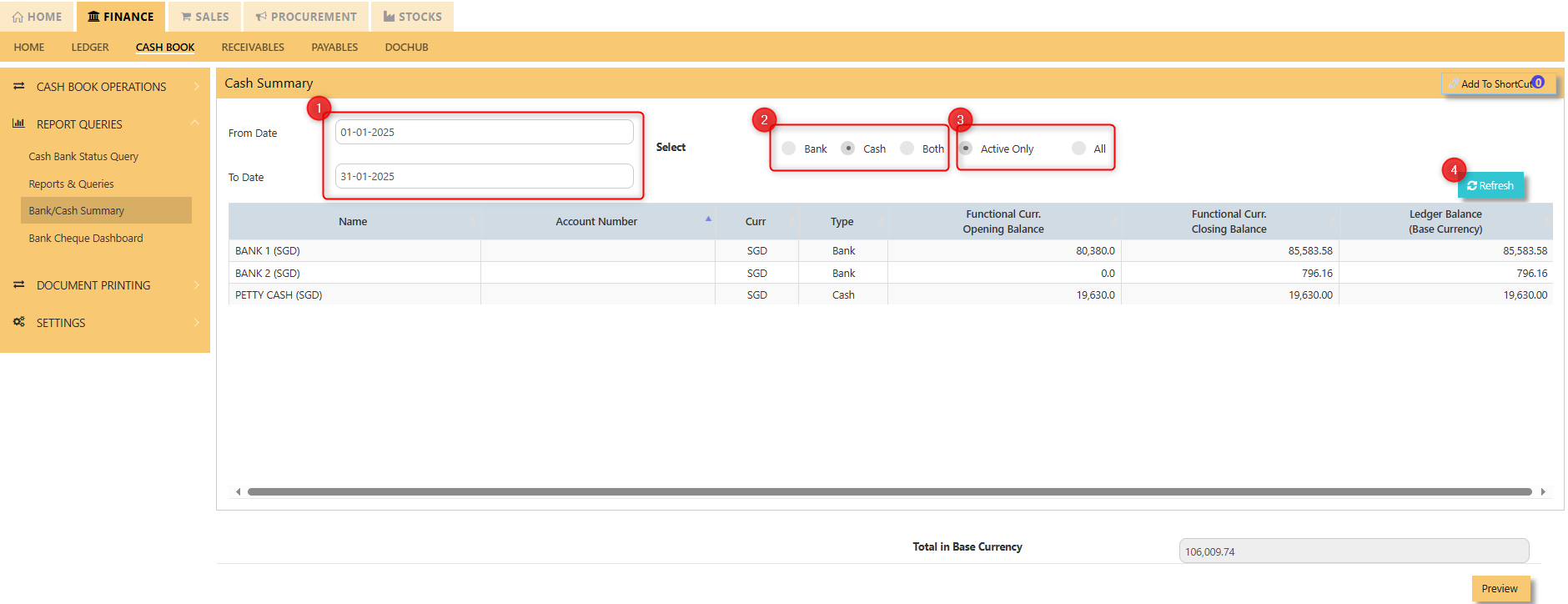
<span style="color: rgb(0, 0, 0);">A Bank/Cash Summary provides an overview of a company's cash opening, closing and ledger balance during a specific period. It helps track the movement of funds and provides a clear snapshot of liquidity and available cash. This summary is essential for ensuring that a company can meet its financial obligations, manage working capital effectively, and reconcile its records with bank statements to ensure accuracy and avoid discrepancies. </span>

[![image.png](https://doc.uniq365.com/uploads/images/gallery/2025-02/scaled-1680-/B23image.png)](https://doc.uniq365.com/uploads/images/gallery/2025-02/B23image.png)

1. <span style="color: rgb(0, 0, 0);">Select the "**FROM**" and "**TO**" dates.</span>
2. <span style="color: rgb(0, 0, 0);">Select the type whether it is **bank**, **cash** and/or **both.**</span>
3. <span style="color: rgb(0, 0, 0);">Select the status whether "**ACTIVE ONLY**" or "**ALL**"</span>
4. <span style="color: rgb(0, 0, 0);">Hit "**REFRESH**" for all transactions to appear in the dashboard.</span>

[![image.png](https://doc.uniq365.com/uploads/images/gallery/2025-02/scaled-1680-/DcAimage.png)](https://doc.uniq365.com/uploads/images/gallery/2025-02/DcAimage.png)

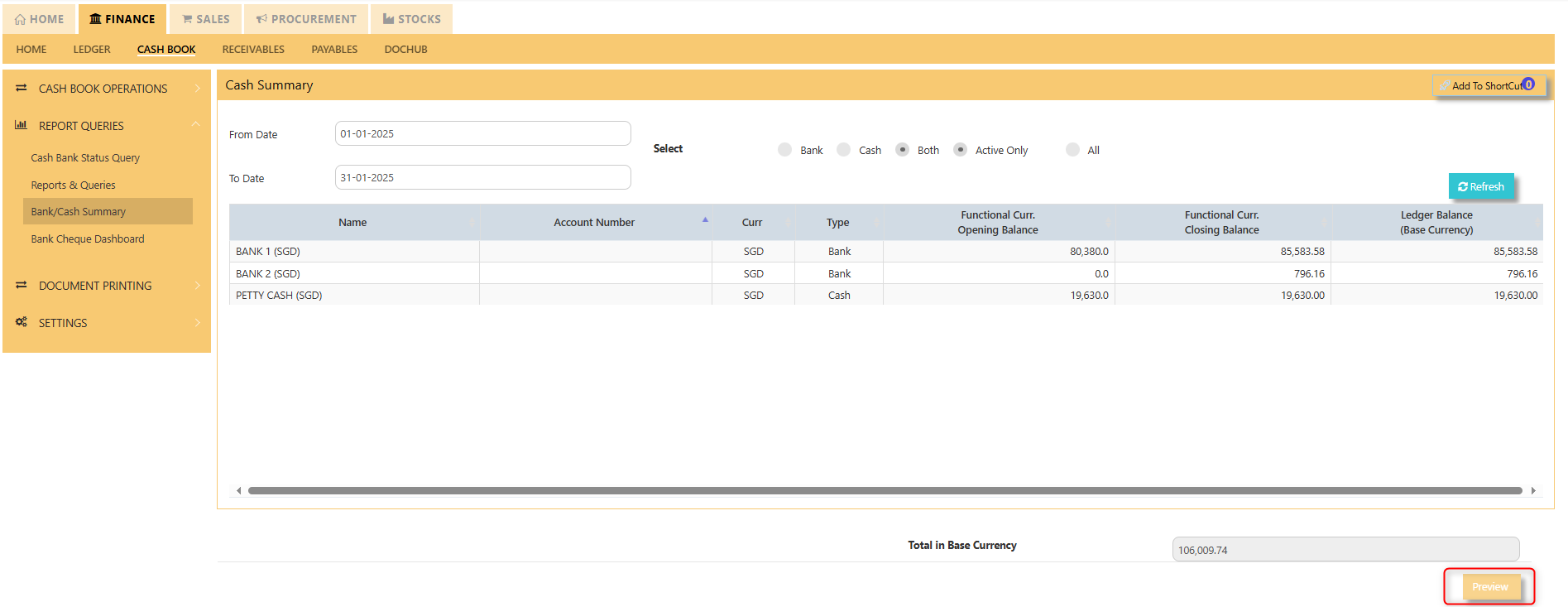
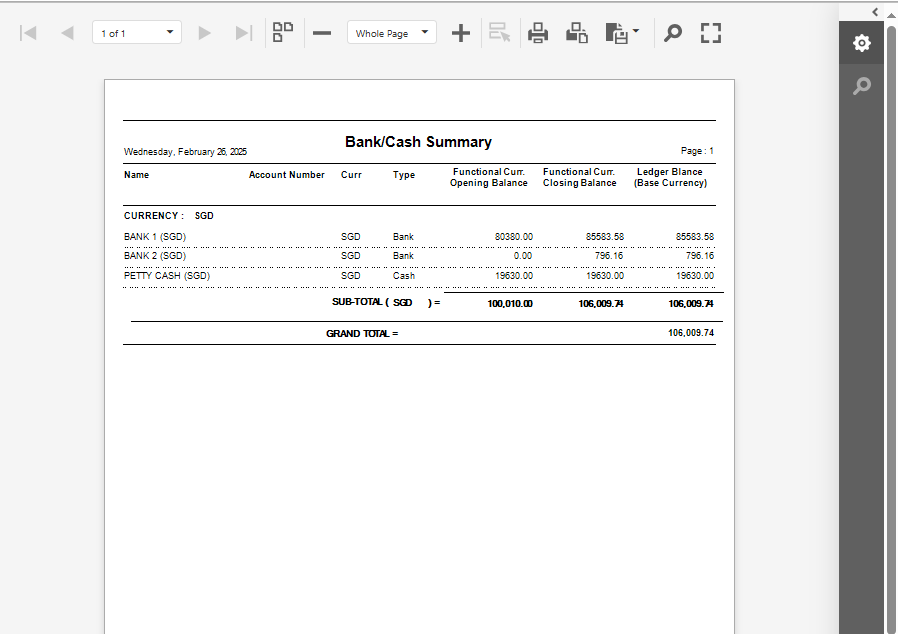
<span style="color: rgb(0, 0, 0);">Click "**PREVIEW**" in the lower right portion of your screen to export Bank/Cash Summary in printable format.</span>

[![image.png](https://doc.uniq365.com/uploads/images/gallery/2025-02/scaled-1680-/1rCimage.png)](https://doc.uniq365.com/uploads/images/gallery/2025-02/1rCimage.png)

</details><details id="bkmrk-bank-cheque-dashboar"><summary>Bank Cheque Dashboard</summary>

<span lang="EN-US" style="font-size: 12.0pt; font-family: 'Segoe UI','sans-serif';">Click <span style="mso-bidi-font-weight: bold;">on **Cash Bank Book – Report &amp; Queries – Cash Bank Status Query**</span></span>

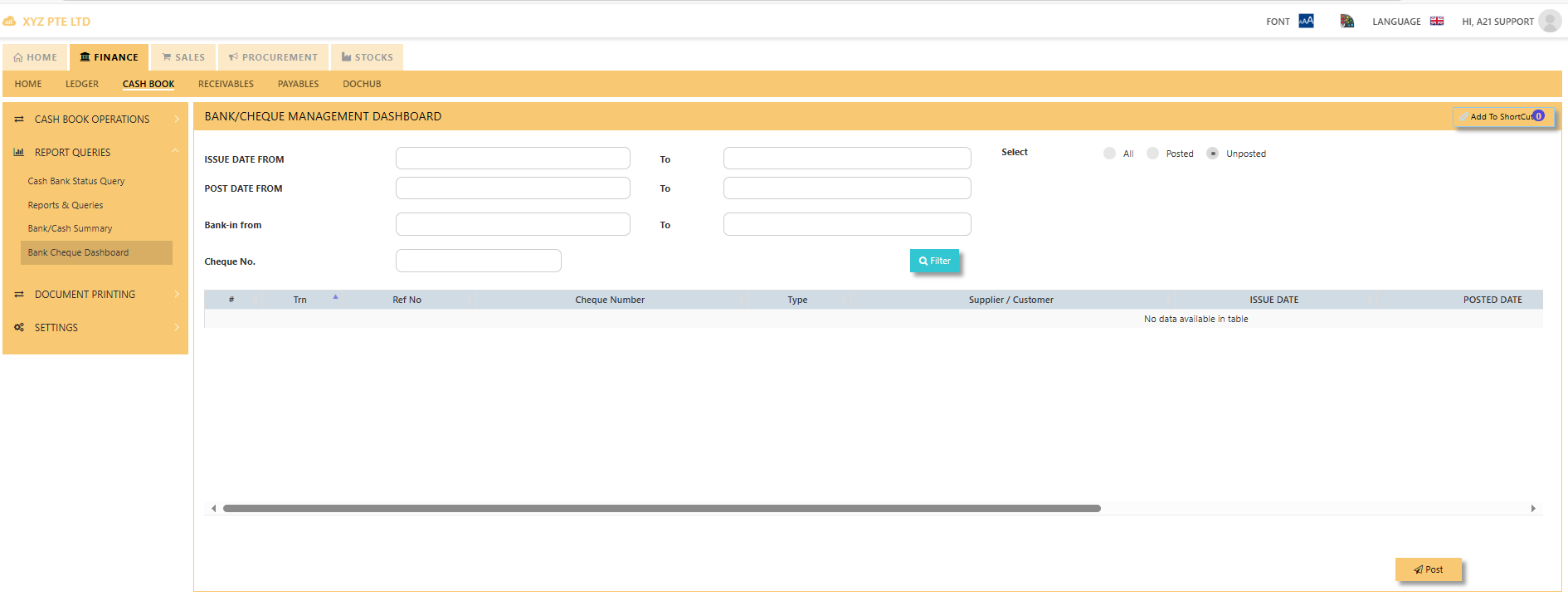
<span style="color: rgb(0, 0, 0);">![image.png](https://doc.uniq365.com/uploads/images/gallery/2025-01/scaled-1680-/C8yimage.png)A Bank/Cheque Management Dashboard shows bank/cheque-related transactions for a business or organization. It consolidates essential data such as Trn, Ref No, Cheque Number, Type, Supplier/Customer, issue date, posted date, bank in/collected date. The dashboard can filter the status of cheque to posted, unposted or both. Filter is also applicable to the issue date, post date, Bank-in from and Cheque No to pull up a transaction.</span>

</details>