# Partners Subscription URL

##### <span style="color: rgb(0, 0, 0);">Partner subscription URL can be found in Partner's Subscription Portal.<span style="mso-fareast-language: EN-SG; mso-no-proof: yes;"><span style="color: rgb(0, 0, 0);"> They may copy this link to for customer's easier registration of account. Link: </span><span style="color: rgb(53, 152, 219);">[https://member.uniq365.com/Membership/Membership/Subscription?partnerId=SG24101003](https://member.uniq365.com/Membership/Membership/Subscription?partnerId=SG24101003)</span></span></span>

[![image.png](https://doc.uniq365.com/uploads/images/gallery/2025-01/scaled-1680-/fY4image.png)](https://doc.uniq365.com/uploads/images/gallery/2025-01/fY4image.png)

##### <span style="color: rgb(0, 0, 0);">**Step 1: Account Information**</span>

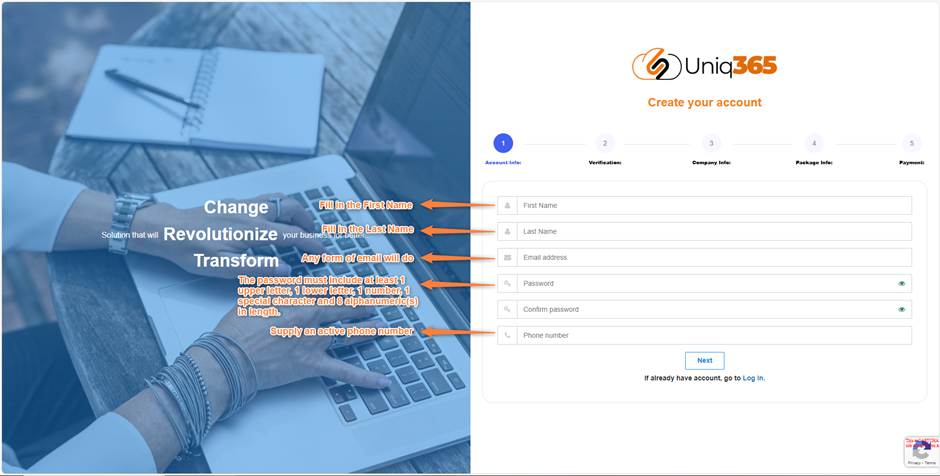
- <span style="color: rgb(0, 0, 0);"><span style="font-family: Symbol; mso-fareast-font-family: Symbol; mso-bidi-font-family: Symbol;"><span style="mso-list: Ignore;"><span style="font: 7pt 'Times New Roman';"> </span></span></span>**First Name.** Fill in the First Name</span>
- <span style="color: rgb(0, 0, 0);"><span style="font: 7pt 'Times New Roman';"> </span>**Last Name.**<span style="text-indent: -18pt;"> Fill in the Last Name</span></span>
- <span style="color: rgb(0, 0, 0);"><span style="font: 7pt 'Times New Roman';"> </span>**Email address**<span style="text-indent: -18pt;">. Supply the information with an active email address. Any form of email will do.</span></span>
- <span style="color: rgb(0, 0, 0);">**Password.**<span style="text-indent: -18pt;"> It must include at least 1 upper letter, 1 lower letter, and 1 number, 1 special character and 8 alphanumeric(s) in length.</span></span>
- <span style="color: rgb(0, 0, 0);">**Phone number**<span style="text-indent: -18pt;">. Supply the information with an active and valid phone number.</span></span>

<span style="color: rgb(0, 0, 0);">Once all the account information is confirmed valid and accurate. To proceed you may click NEXT.</span>

[![image.png](https://doc.uniq365.com/uploads/images/gallery/2025-01/scaled-1680-/Mrsimage.png)](https://doc.uniq365.com/uploads/images/gallery/2025-01/Mrsimage.png)

##### <span style="color: rgb(0, 0, 0);">**Step 2: Verification**</span>

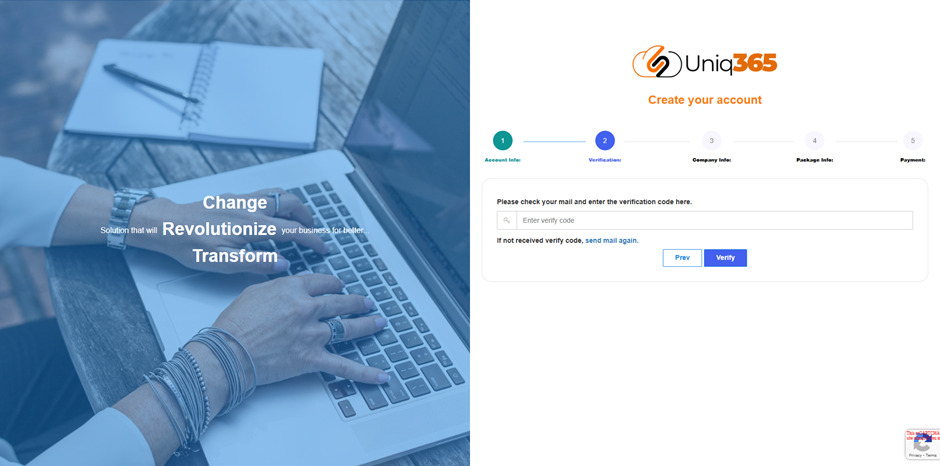
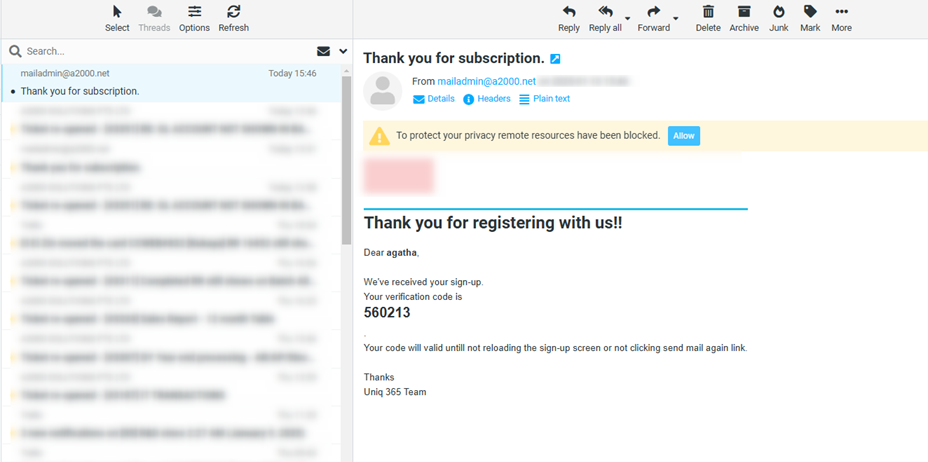
<span style="font-size: 11pt; line-height: 107%; font-family: Calibri, 'sans-serif'; color: rgb(0, 0, 0);">Shortly after clicking NEXT a verification email will be sent to your email; a sample email will be below. Kindly encode the verification code then click verify.</span>

[![image.png](https://doc.uniq365.com/uploads/images/gallery/2025-01/scaled-1680-/7VSimage.png)](https://doc.uniq365.com/uploads/images/gallery/2025-01/7VSimage.png)

[![image.png](https://doc.uniq365.com/uploads/images/gallery/2025-01/scaled-1680-/bzTimage.png)](https://doc.uniq365.com/uploads/images/gallery/2025-01/bzTimage.png)
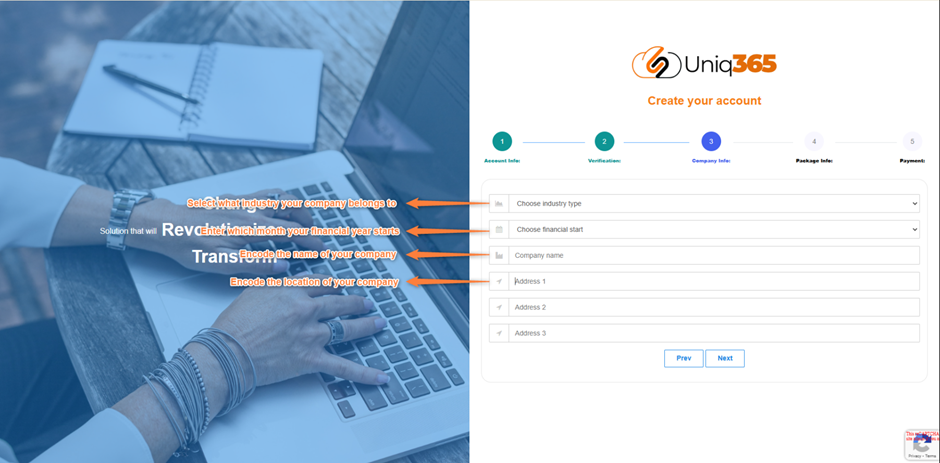
##### <span style="color: rgb(0, 0, 0);">**Step 3: Company Information**</span>

<span style="color: rgb(0, 0, 0);"><span style="font-family: Symbol; mso-fareast-font-family: Symbol; mso-bidi-font-family: Symbol;"><span style="mso-list: Ignore;">·<span style="font: 7pt 'Times New Roman';"> </span></span></span>**Industry type.** Choose from the dropdown the industry that your company belongs to.</span>

<span style="color: rgb(0, 0, 0);"><span style="font-family: Symbol; mso-fareast-font-family: Symbol; mso-bidi-font-family: Symbol;"><span style="mso-list: Ignore;">·<span style="font: 7pt 'Times New Roman';"> </span></span></span>**Financial Start.** Enter the start of your financial period.</span>

<span style="color: rgb(0, 0, 0);"><span style="font-family: Symbol; mso-fareast-font-family: Symbol; mso-bidi-font-family: Symbol;"><span style="mso-list: Ignore;">·<span style="font: 7pt 'Times New Roman';"> </span></span></span>**Company Name.** Encode the name of your company.</span>

<span style="color: rgb(0, 0, 0);"><span style="font-family: Symbol; mso-fareast-font-family: Symbol; mso-bidi-font-family: Symbol;"><span style="mso-list: Ignore;">·<span style="font: 7pt 'Times New Roman';"> </span></span></span>**Address. <span style="mso-spacerun: yes;"> </span>**Encode the complete address of your company.</span>

<span style="color: rgb(0, 0, 0);"> </span>

<span style="color: rgb(0, 0, 0);">Make sure that all the information is verified before clicking next.</span>

[![image.png](https://doc.uniq365.com/uploads/images/gallery/2025-01/scaled-1680-/2lvimage.png)](https://doc.uniq365.com/uploads/images/gallery/2025-01/2lvimage.png)

##### <span style="color: rgb(0, 0, 0);">**Step 4: Package Information** </span>

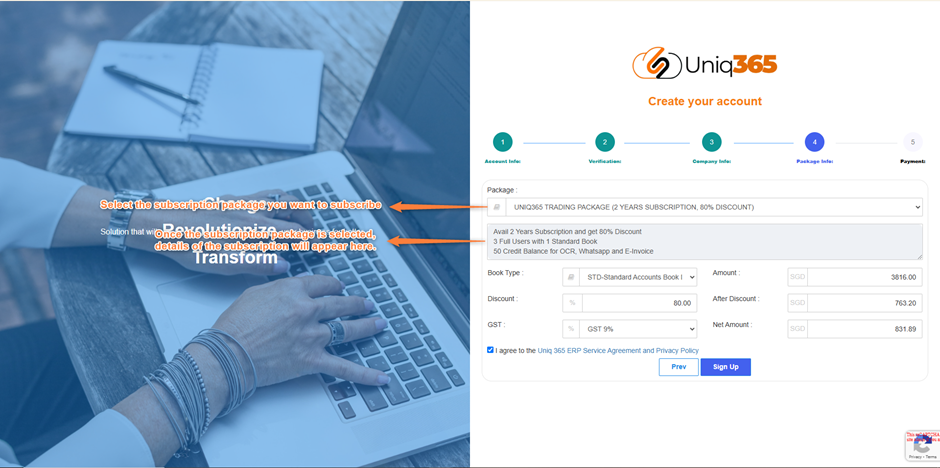
<span style="color: rgb(0, 0, 0);"><span style="font-family: Symbol; mso-fareast-font-family: Symbol; mso-bidi-font-family: Symbol;"><span style="mso-list: Ignore;">·<span style="font: 7pt 'Times New Roman';"> </span></span></span>**Subscription Package.** Select the subscription package you want to avail.</span>

<span style="color: rgb(0, 0, 0);"><span style="font-family: Symbol; mso-fareast-font-family: Symbol; mso-bidi-font-family: Symbol;"><span style="mso-list: Ignore;">·<span style="font: 7pt 'Times New Roman';"> </span></span></span>**Subscription Package Details. <span style="mso-spacerun: yes;"> </span>**Once the subscription package is selected, details regarding how many users, years of subscription and other inclusion of the package will appear.</span>

<span style="color: rgb(0, 0, 0);"><span style="font-family: Symbol; mso-fareast-font-family: Symbol; mso-bidi-font-family: Symbol;"><span style="mso-list: Ignore;">·<span style="font: 7pt 'Times New Roman';"> </span></span></span>**Amounts and discount.** The amount that will be paid as well as the discount availed will be shown.</span>

<span style="font-size: 11pt; line-height: 107%; font-family: Calibri, 'sans-serif'; color: rgb(0, 0, 0);">After verifying all the information, Click the Uniq 365 ERP Service Agreement and Privacy Policy. If you agree to the policy, please tick the box so you can proceed to sign up. Before you clicked, **Sign Up**, please makes sure that all your details from 1-4 are correct because once you clicked you can never go back with the previous as it will direct you to the next phase which is Payment.</span>

[![image.png](https://doc.uniq365.com/uploads/images/gallery/2025-01/scaled-1680-/xVeimage.png)](https://doc.uniq365.com/uploads/images/gallery/2025-01/xVeimage.png)

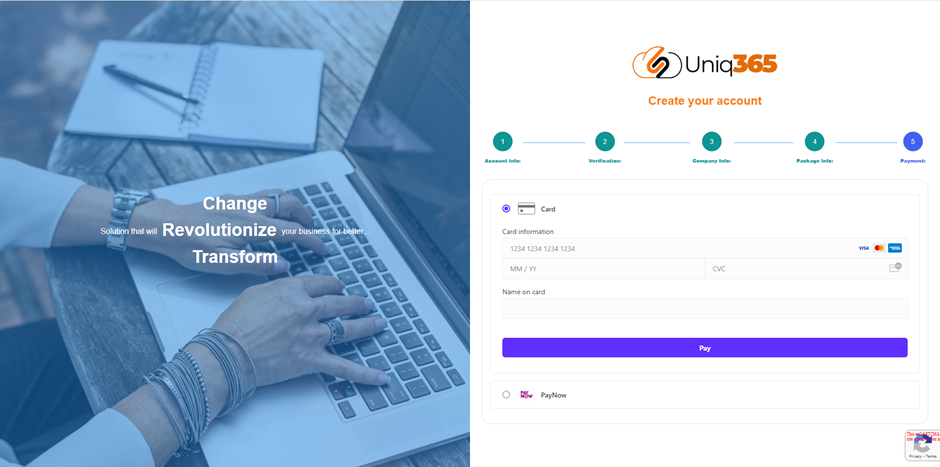
##### <span style="color: rgb(0, 0, 0);">**Step 5: Payment** </span>

<span style="color: rgb(0, 0, 0);"><span style="font-family: Symbol; mso-fareast-font-family: Symbol; mso-bidi-font-family: Symbol;"><span style="mso-list: Ignore;">·<span style="font: 7pt 'Times New Roman';"> </span></span></span>You may enter your card information to proceed with the payment.</span>