# Partners Subscription Portal

##### <span style="color: rgb(0, 0, 0);">**Uniq365 Partner's Subscription Portal** is a dedicated online platform designed for partners to manage their customer's subscription-related activities. This portal typically provides a range of features that allow partners to interact with the services or products they are subscribed to, track usage, and perform administrative</span><span style="color: rgb(0, 0, 0);"> tasks.</span>

##### <span style="color: rgb(0, 0, 0);">You may access the portal through this link: [https://member.uniq365.com/Membership/MemberShipIndirectUsers/Login](https://member.uniq365.com/Membership/MemberShipIndirectUsers/Login)</span>

[![image.png](https://doc.uniq365.com/uploads/images/gallery/2025-01/scaled-1680-/XuEimage.png)](https://doc.uniq365.com/uploads/images/gallery/2025-01/XuEimage.png)

Log in first using the partner's email and password.

<details id="bkmrk-dashboard-copy-subsc"><summary>DASHBOARD</summary>

<span style="color: rgb(0, 0, 0);">**[![image.png](https://doc.uniq365.com/uploads/images/gallery/2025-01/scaled-1680-/wYbimage.png)](https://doc.uniq365.com/uploads/images/gallery/2025-01/wYbimage.png)Copy Subscription URL.** Every partner has their own link that they can put into their website for hassle free subscription of Uniq365. This website will redirect their customers to Customer Subscription Portal.</span>

<span style="color: rgb(0, 0, 0);">**Commission.** In the commission part of the dashboard the partner will be able to see the Percent, Receipt and their Receivable for monitoring. <span style="mso-spacerun: yes;"> </span></span>

<span style="color: rgb(0, 0, 0);">**Customer.** In the customer part of the dashboard the partner can monitor the current status of the subscription of their customer. This is to monitor the number of customers who are new, for renewal or expired.</span>

<span style="color: rgb(0, 0, 0);">**Distributor.<span style="mso-spacerun: yes;"> </span>**In the distributor part of the dashboard, it shows basic information of the distributor.</span>

</details>
<details id="bkmrk-how-to-add-customers"><summary>CUSTOMERS</summary>

<span style="color: rgb(0, 0, 0);">[![image.png](https://doc.uniq365.com/uploads/images/gallery/2025-01/scaled-1680-/0Zjimage.png)](https://doc.uniq365.com/uploads/images/gallery/2025-01/0Zjimage.png)On this tab it shows all the list of the partner’s customer. It shows company information such as Country, Code, Name of the Person to contact, Company Name, Email, Expiration Date and the receivable amount from customer.</span>

##### <span style="color: rgb(0, 0, 0);">**HOW TO ADD CUSTOMERS**</span>

<span style="color: rgb(0, 0, 0);">[![image.png](https://doc.uniq365.com/uploads/images/gallery/2025-01/scaled-1680-/t4aimage.png)](https://doc.uniq365.com/uploads/images/gallery/2025-01/t4aimage.png)</span>

<span style="color: rgb(0, 0, 0);">Under customer tab you can click add then it will prompt the steps that you need to do in order to proceed with creating a customer.</span>

##### <span style="color: rgb(0, 0, 0);">**STEP 1: CUSTOMER DETAILS**</span>

<span style="color: rgb(0, 0, 0);">**[![image.png](https://doc.uniq365.com/uploads/images/gallery/2025-01/scaled-1680-/ngximage.png)](https://doc.uniq365.com/uploads/images/gallery/2025-01/ngximage.png)**</span>

**Fill in the above information**

- Usercode.
- Username.
- Email Address.
- Phone Number.
- Password.
- Confirm Password.
- Company Name.
- Company Address.
- Select Package.

<span style="color: rgb(0, 0, 0);">Once all these following information are filled after selecting package it will direct you to **STEP 5 for Payment.** Steps 2-4 will be following the default for the package that has been selected in the first step. If you want to review the following inclusions of the package you may revisit Steps 2-4.</span>

##### <span style="color: rgb(0, 0, 0);">**STEP 2: USER DETAILS**</span>

<span style="color: rgb(0, 0, 0);">[![image.png](https://doc.uniq365.com/uploads/images/gallery/2025-01/scaled-1680-/Yjcimage.png)](https://doc.uniq365.com/uploads/images/gallery/2025-01/Yjcimage.png)</span>

<span style="color: rgb(0, 0, 0);">In Step 2: User details, partners can modify the number of users for each type. </span>

##### <span style="color: rgb(0, 0, 0);">**TYPES OF USERS**</span>

<span style="color: rgb(0, 0, 0);">A. **FINANCE USER**. User who are assigned this access can only access the finance tab, which comprises the General Ledger, Cash Book, Accounts Receivables and Accounts Payable module.</span>

<span style="color: rgb(0, 0, 0);">B. **OPERATIONS USER**. User who are assigned this access can only access the operational tabs, which comprises the Sales, Procurement and Inventory module.</span>

<span style="color: rgb(0, 0, 0);">C. **MOBILE USER**. User who are assigned this access can only access the system via a mobile device to run mobile sales and warehouse functions.</span>

<span style="color: rgb(0, 0, 0);">D. **FULL USER.** User who are assigned this access can only access the all the tabs and modules which are accessible to FINANCE, OPERATIONS and MOBILE users</span>

##### **CAN I ADD/REDUCE NEW USERS AT ANYTIME?**

<p class="callout success"><span style="color: rgb(0, 0, 0);">Yes, you may add any number of new users in your Subscription Plan. Any users added half-way in the subscription period will be pro-rated to the duration left till the next expiry. For example, in 3 months into your subscription period you may add a new user. This new user will be billed for only 9 months till the end of the mother-contract.</span></p>

<p class="callout danger align-left"><span style="color: rgb(0, 0, 0);">No, you may not reduce the number of users halfway through a subscription period. </span><span style="color: rgb(0, 0, 0);">You must wait till the end of subscription period and then reduce according to your </span><span style="color: rgb(0, 0, 0);">needs, only during renewal.</span></p>

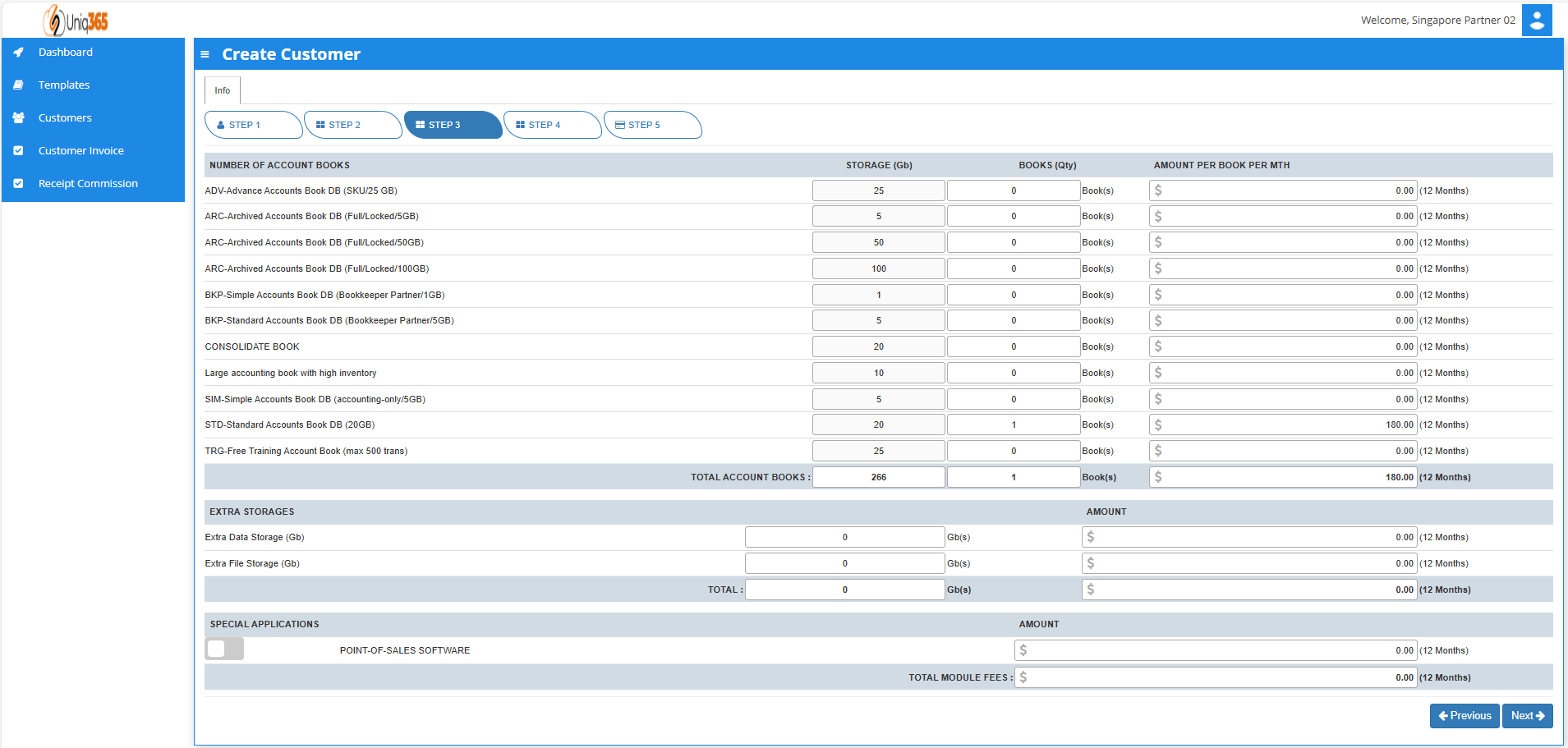
##### <span style="color: rgb(0, 0, 0);">**STEP 3: ACCOUNT BOOK DETAILS, EXTRA STORAGE &amp; SPECIAL APPLICATION IF ANY**</span>


<span style="color: rgb(0, 0, 0);">[![image.png](https://doc.uniq365.com/uploads/images/gallery/2025-01/scaled-1680-/nMlimage.png)](https://doc.uniq365.com/uploads/images/gallery/2025-01/nMlimage.png)</span>

<span style="color: rgb(0, 0, 0);"><span class="output-sentence" id="bkmrk-depending%C2%A0on%C2%A0the%C2%A0pac-1"><span class="MuiBox-root css-avfhld"><span id="bkmrk-depending%C2%A0on%C2%A0the%C2%A0pac-2"><span data-testid="output-sentence-0"><span class="css-1ko3g0e" id="bkmrk-depending%C2%A0on%C2%A0"><span data-testid="output-word-0-0-0"><span class="css-1g9q2al">Depending </span></span><span data-testid="output-word-0-0-1"><span class="css-1g9q2al">on </span></span></span><span class="css-1ko3g0e" id="bkmrk-the%C2%A0package%C2%A0"><span data-testid="output-word-1-0-0"><span class="css-1g9q2al">the </span></span><span data-testid="output-word-1-0-1"><span class="css-1g9q2al">package </span></span></span><span class="css-1ko3g0e" id="bkmrk-they%C2%A0have%C2%A0"><span data-testid="output-word-2-0-0"><span class="css-10o52y0">they </span></span><span data-testid="output-word-2-0-1"><span class="css-10o52y0">have </span></span></span><span class="css-1ko3g0e" id="bkmrk-selected%2C%C2%A0"><span data-testid="output-word-3-0-0"><span class="css-h5d7i9">selected, </span></span></span><span class="css-1ko3g0e" id="bkmrk-the%C2%A0details%C2%A0"><span data-testid="output-word-4-0-0"><span class="css-10o52y0">the </span></span><span data-testid="output-word-4-0-1"><span class="css-h5d7i9">details </span></span></span><span class="css-1ko3g0e" id="bkmrk-on%C2%A0"><span data-testid="output-word-5-0-0"><span class="css-10o52y0">on </span></span></span><span class="css-1ko3g0e" id="bkmrk-the%C2%A0quantity%C2%A0"><span data-testid="output-word-6-0-0"><span class="css-10o52y0">the </span></span><span data-testid="output-word-6-0-1"><span class="css-h5d7i9">quantity </span></span></span><span class="css-1ko3g0e" id="bkmrk-of%C2%A0"><span data-testid="output-word-7-0-0"><span class="css-10o52y0">of </span></span></span><span class="css-1ko3g0e" id="bkmrk-storage%C2%A0"><span data-testid="output-word-8-0-0"><span class="css-10o52y0">storage </span></span></span><span class="css-1ko3g0e" id="bkmrk-and%C2%A0"><span data-testid="output-word-9-0-0"><span class="css-10o52y0">and </span></span></span><span class="css-1ko3g0e" id="bkmrk-account%C2%A0books%C2%A0"><span data-testid="output-word-10-0-0"><span class="css-10o52y0">account </span></span><span data-testid="output-word-10-0-1"><span class="css-h5d7i9">books </span></span></span><span class="css-1ko3g0e" id="bkmrk-will%C2%A0be%C2%A0"><span data-testid="output-word-11-0-0"><span class="css-10o52y0">will </span></span><span data-testid="output-word-11-0-1"><span class="css-10o52y0">be </span></span></span><span class="css-1ko3g0e" id="bkmrk-displayed%C2%A0"><span data-testid="output-word-12-0-0"><span class="css-1tmeul0">displayed </span></span></span><span class="css-1ko3g0e" id="bkmrk-here."><span data-testid="output-word-13-0-0"><span class="css-0">here.</span></span></span></span> </span></span></span><span class="output-sentence" id="bkmrk-in%C2%A0any%C2%A0event%2C%C2%A0they%C2%A0c"><span class="MuiBox-root css-avfhld"><span id="bkmrk-in%C2%A0any%C2%A0event%2C%C2%A0they%C2%A0c-1"><span data-testid="output-sentence-1"><span class="css-1ko3g0e" id="bkmrk-in%C2%A0"><span data-testid="output-word-0-1-0"><span class="css-0">In </span></span></span><span class="css-1ko3g0e" id="bkmrk-any%C2%A0event%2C%C2%A0"><span data-testid="output-word-1-1-0"><span class="css-0">any </span></span><span data-testid="output-word-1-1-1"><span class="css-1tmeul0">event, </span></span></span><span class="css-1ko3g0e" id="bkmrk-they%C2%A0"><span data-testid="output-word-2-1-0"><span class="css-0">they </span></span></span><span class="css-1ko3g0e" id="bkmrk-can%C2%A0access%C2%A0"><span data-testid="output-word-3-1-0"><span class="css-10o52y0">can </span></span><span data-testid="output-word-3-1-1"><span class="css-h5d7i9">access </span></span></span><span class="css-1ko3g0e" id="bkmrk-more%C2%A0storage%C2%A0"><span data-testid="output-word-4-1-0"><span class="css-h5d7i9">more </span></span><span data-testid="output-word-4-1-1"><span class="css-10o52y0">storage </span></span></span><span class="css-1ko3g0e" id="bkmrk-if%C2%A0"><span data-testid="output-word-5-1-0"><span class="css-10o52y0">if </span></span></span><span class="css-1ko3g0e" id="bkmrk-they%27ve%C2%A0"><span data-testid="output-word-6-1-0"><span class="css-h5d7i9">they've </span></span></span><span class="css-1ko3g0e" id="bkmrk-used%C2%A0"><span data-testid="output-word-7-1-0"><span class="css-h5d7i9">used </span></span></span><span class="css-1ko3g0e" id="bkmrk-up%C2%A0"><span data-testid="output-word-8-1-0"><span class="css-h5d7i9">up </span></span></span><span class="css-1ko3g0e" id="bkmrk-all%C2%A0"><span data-testid="output-word-9-1-0"><span class="css-h5d7i9">all </span></span></span><span class="css-1ko3g0e" id="bkmrk-of%C2%A0their%C2%A0"><span data-testid="output-word-10-1-0"><span class="css-h5d7i9">of </span></span><span data-testid="output-word-10-1-1"><span class="css-10o52y0">their </span></span></span><span class="css-1ko3g0e" id="bkmrk-subscription%C2%A0"><span data-testid="output-word-11-1-0"><span class="css-h5d7i9">subscription </span></span></span><span class="css-1ko3g0e" id="bkmrk-storage-by-modifying"><span data-testid="output-word-12-1-0"><span class="css-0">storage by modifying the desired add ons on this step.</span></span></span></span></span></span></span></span>

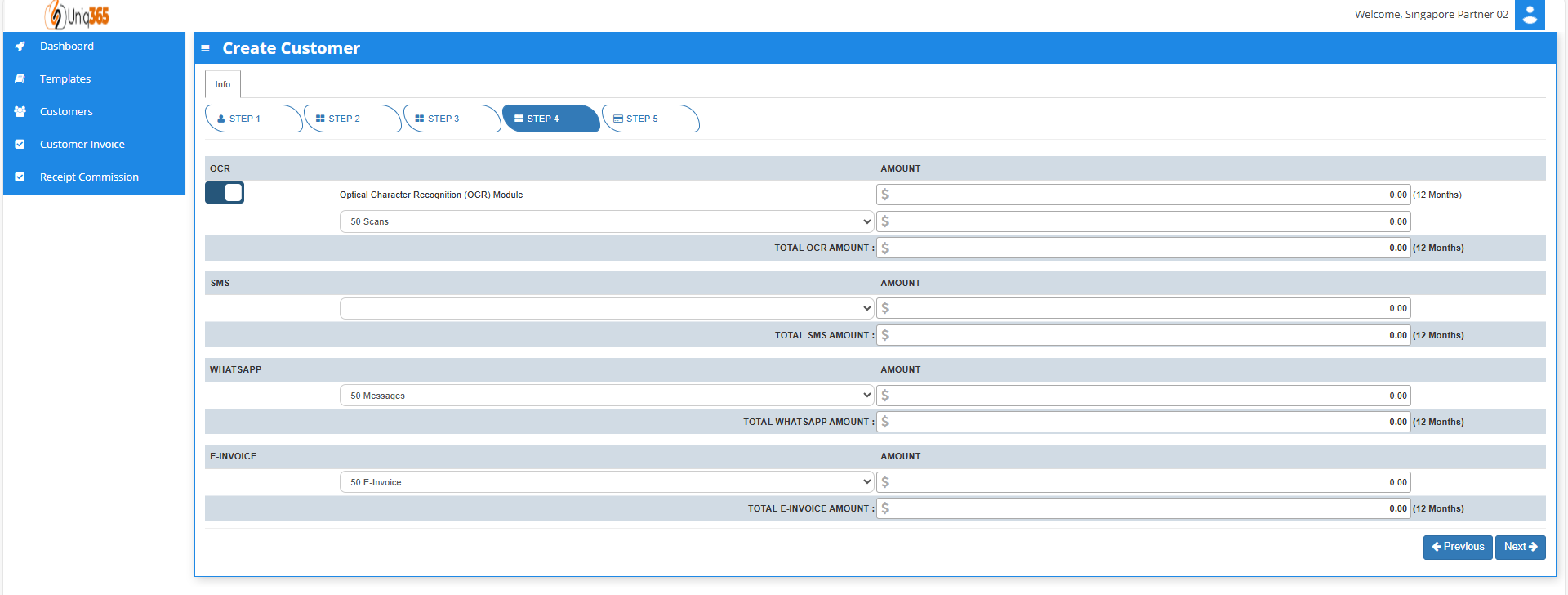
##### <span style="color: rgb(0, 0, 0);">**STEP 4: OCR, SMS, WHATS APP AND E-INVOICE LIMIT.**</span>

 <span style="color: rgb(0, 0, 0);">[![image.png](https://doc.uniq365.com/uploads/images/gallery/2025-01/scaled-1680-/I65image.png)](https://doc.uniq365.com/uploads/images/gallery/2025-01/I65image.png)</span>

<span style="color: rgb(0, 0, 0);">In Step 4, Any excess of usage in the package that the customer availed it will be subject to corresponding charges.</span>

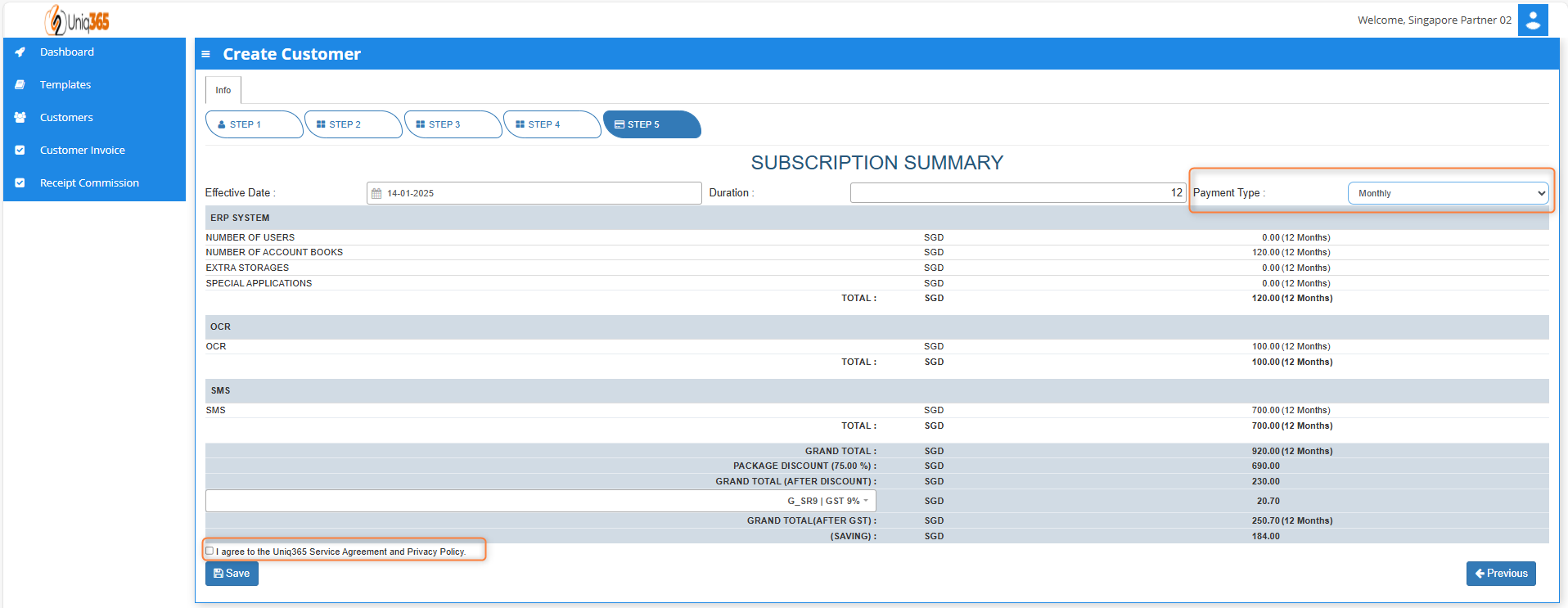
##### <span style="color: rgb(0, 0, 0);">**STEP 5:** **SUBSCRIPTION SUMMARY** </span>


<span style="color: rgb(0, 0, 0);">[![image.png](https://doc.uniq365.com/uploads/images/gallery/2025-01/scaled-1680-/Sxgimage.png)](https://doc.uniq365.com/uploads/images/gallery/2025-01/Sxgimage.png)</span>

- <span style="color: rgb(0, 0, 0);">Select the payment type in the dropdown, options are either monthly or yearly.</span>
- <span style="color: rgb(0, 0, 0);">Tick the box to agree to the A2000ERP Service Agreement &amp; Privacy Policy before saving.</span>

<span style="color: rgb(0, 0, 0);">[![image.png](https://doc.uniq365.com/uploads/images/gallery/2025-01/scaled-1680-/32Jimage.png)](https://doc.uniq365.com/uploads/images/gallery/2025-01/32Jimage.png)</span>

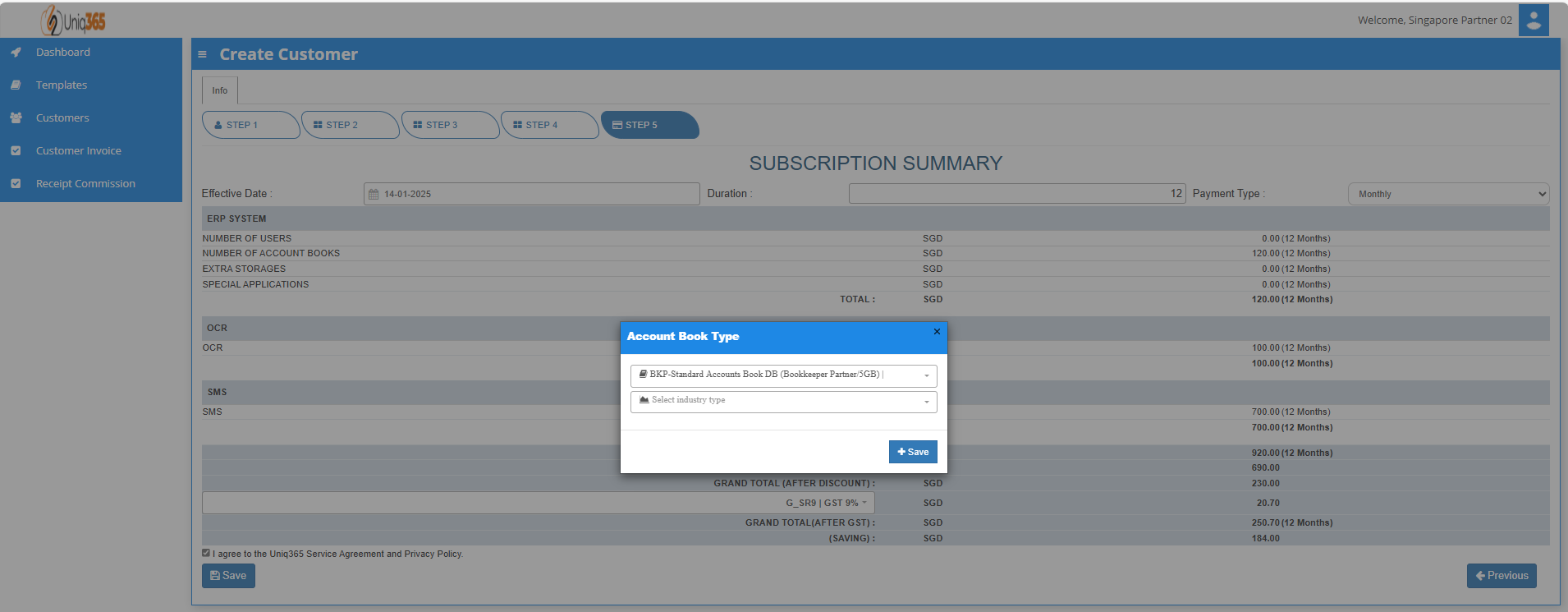
- <span style="color: rgb(0, 0, 0);">After saving information, a pop-up message will appear so you can select the account book type and the industry type.[![image.png](https://doc.uniq365.com/uploads/images/gallery/2025-01/scaled-1680-/Mthimage.png)](https://doc.uniq365.com/uploads/images/gallery/2025-01/Mthimage.png)</span>
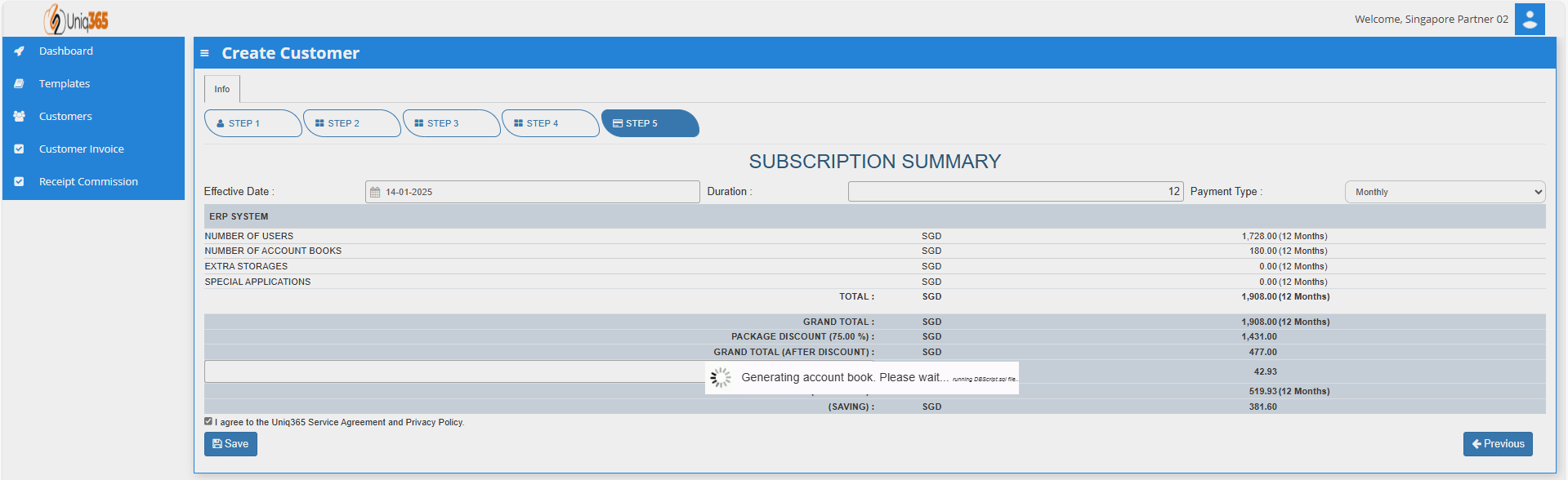
- <span style="color: rgb(0, 0, 0);">Once hit save, a message will prompt indicating that system is currently generating account book. Please wait and do not do anything. If there is any interruption during the generation of account book, please reach out to us. </span>

</details><details id="bkmrk-customer-invoice-onc"><summary>CUSTOMER INVOICE</summary>

[![image.png](https://doc.uniq365.com/uploads/images/gallery/2025-01/scaled-1680-/Bcvimage.png)](https://doc.uniq365.com/uploads/images/gallery/2025-01/Bcvimage.png)

[![image.png](https://doc.uniq365.com/uploads/images/gallery/2025-01/scaled-1680-/z1Dimage.png)](https://doc.uniq365.com/uploads/images/gallery/2025-01/z1Dimage.png)

<span style="color: rgb(0, 0, 0);">Once the subscription package has been finalized. Partners may assist in printing invoice double click any column in the line and download the preview of invoice. They can download the invoice, but the billing and collection will be done by the distributors.</span>

</details><span style="color: rgb(0, 0, 0);"><span class="output-sentence" id="bkmrk--11"><span class="MuiBox-root css-avfhld"><span id="bkmrk--12"><span data-testid="output-sentence-0"><span class="css-1ko3g0e" id="bkmrk--13"></span></span></span></span></span></span>

<details id="bkmrk-receipt-commission-%C2%A0"><summary>RECEIPT COMMISSION</summary>

[![image.png](https://doc.uniq365.com/uploads/images/gallery/2025-01/scaled-1680-/iIqimage.png)](https://doc.uniq365.com/uploads/images/gallery/2025-01/iIqimage.png)

<span style="color: rgb(0, 0, 0);">All the receipts of commission from customers and distributors will reflect here. Once the distributor processed the commission it will be visible here in the receipt invoices.</span>

##### <span style="color: rgb(0, 0, 0);">**HOW TO VIEW CUSTOMER INFORMATION**</span>

<span style="color: rgb(0, 0, 0);">**[![image.png](https://doc.uniq365.com/uploads/images/gallery/2025-01/scaled-1680-/ilRimage.png)](https://doc.uniq365.com/uploads/images/gallery/2025-01/ilRimage.png)** To view the full information of the customer, you may double click on any column in the customer line to edit customer information.  
</span>

<span style="color: rgb(0, 0, 0);">[![image.png](https://doc.uniq365.com/uploads/images/gallery/2025-01/scaled-1680-/k7yimage.png)](https://doc.uniq365.com/uploads/images/gallery/2025-01/k7yimage.png)  
</span>

<span style="color: rgb(0, 0, 0);">Under customer's home tab, you will be able to see the customer profile and usage balances.</span>

<span style="color: rgb(0, 0, 0);">**STEP 1**: Customer Details</span>

<span style="color: rgb(0, 0, 0);">[![image.png](https://doc.uniq365.com/uploads/images/gallery/2025-01/scaled-1680-/Ysrimage.png)](https://doc.uniq365.com/uploads/images/gallery/2025-01/Ysrimage.png)</span>

<span style="color: rgb(0, 0, 0);">Under the Update Subscription, the following steps are familiar as it is similar to adding a customer. You will be able to update the current subscription of the customer.</span>

<span style="color: rgb(0, 0, 0);">**STEP 2:** User Details</span>

<span style="color: rgb(0, 0, 0);">[![image.png](https://doc.uniq365.com/uploads/images/gallery/2025-01/scaled-1680-/Rd1image.png)](https://doc.uniq365.com/uploads/images/gallery/2025-01/Rd1image.png)</span>

<span style="color: rgb(0, 0, 0);">You may add any number of new users in your Subscription Plan. Any users added half-way in the subscription period will be pro-rated to the duration left till the next expiry. </span>

<span style="color: rgb(0, 0, 0);">**STEP 3:** Account Book Details, Extra Storage &amp; Special Application If Any</span>

<span style="color: rgb(0, 0, 0);">[![image.png](https://doc.uniq365.com/uploads/images/gallery/2025-01/scaled-1680-/FHFimage.png)](https://doc.uniq365.com/uploads/images/gallery/2025-01/FHFimage.png)</span>

<span style="color: rgb(0, 0, 0);">The information for the number of account book and storage will be reflected here depending on the package that they have availed. If in any case that they have reached their subscribed storage they can avail extra storages as desired.</span>

<span style="color: rgb(0, 0, 0);">**STEP 4:** OCR, SMS, WhatsApp And E-Invoice Limit.</span>

<span style="color: rgb(0, 0, 0);">[![image.png](https://doc.uniq365.com/uploads/images/gallery/2025-01/scaled-1680-/efNimage.png)](https://doc.uniq365.com/uploads/images/gallery/2025-01/efNimage.png)</span>

<span style="color: rgb(0, 0, 0);">For the OCR and WhatsApp feature, 50 scans and 50 messages, respectively are considered free, if in any case their transaction will exceed that they can modify here with corresponding charges. </span>

<span style="color: rgb(0, 0, 0);">**STEP 5:** Subscription Summary</span>

<span style="color: rgb(0, 0, 0);">[![image.png](https://doc.uniq365.com/uploads/images/gallery/2025-01/scaled-1680-/VR4image.png)](https://doc.uniq365.com/uploads/images/gallery/2025-01/VR4image.png)</span>

</details>