# Overview - Receivables
#### **RECEIVABLE MODULE**
##### This module contains the Accounts Receivable (AR) entry options for various receivables transactions such as receipts and real-time GL posting.
\_\_\_\_\_\_\_\_\_\_\_\_\_\_\_\_\_\_\_\_\_\_\_\_\_\_\_\_\_\_\_\_\_\_\_\_\_\_\_\_\_\_\_\_\_\_\_\_\_\_\_\_\_\_\_\_\_\_\_\_\_\_\_\_\_\_\_\_\_\_\_\_\_\_\_\_\_\_\_\_\_\_\_\_\_\_\_\_\_\_\_\_\_\_\_\_\_\_\_\_\_\_\_\_\_\_\_\_\_\_\_\_\_\_\_\_\_\_\_\_\_\_\_\_\_\_\_\_\_\_\_\_\_\_
#### **MENU NAVIGATION**
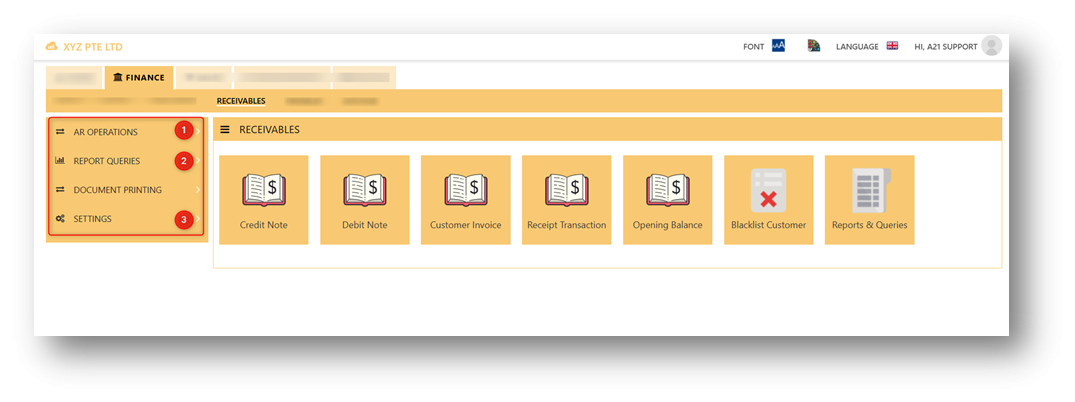
##### Sub-menu items of RECEIVABLE MODULE are listed below:
[](https://doc.uniq365.com/uploads/images/gallery/2025-01/Bjqimage.png)
The **RECEIVABLE MODULE** has 3 tabs, as shown above, namely, Operations, Report Queries, and Settings.
**AR OPERATIONS** is where transactions are entered, like receivable transactions and opening balances.
**REPORT QUERIES** contains all the account receivable reports.
**SETTINGS** is where the master records are created.