# Overview - Purchase Module
#### **PROCUREMENT MODULE**
#### The Procurement Module in Uniq365 is where all the Purchase transactions take place. Uniq365 is able to handle the various Purchases methods to cater to the different needs of different organizations. In this section, we will explore the different types of entries made and how these entries affect the ledger as well as the inventory status.
\_\_\_\_\_\_\_\_\_\_\_\_\_\_\_\_\_\_\_\_\_\_\_\_\_\_\_\_\_\_\_\_\_\_\_\_\_\_\_\_\_\_\_\_\_\_\_\_\_\_\_\_\_\_\_\_\_\_\_\_\_\_\_\_\_\_\_\_\_\_\_\_\_\_\_\_\_\_\_\_\_\_\_\_\_\_\_\_\_\_\_\_\_\_\_\_\_\_\_\_\_\_\_\_\_\_\_\_\_\_\_\_\_\_\_\_\_\_\_\_\_\_\_\_\_\_\_\_\_\_\_\_\_\_\_\_\_\_\_\_\_\_\_\_
#### **MENU NAVIGATION**
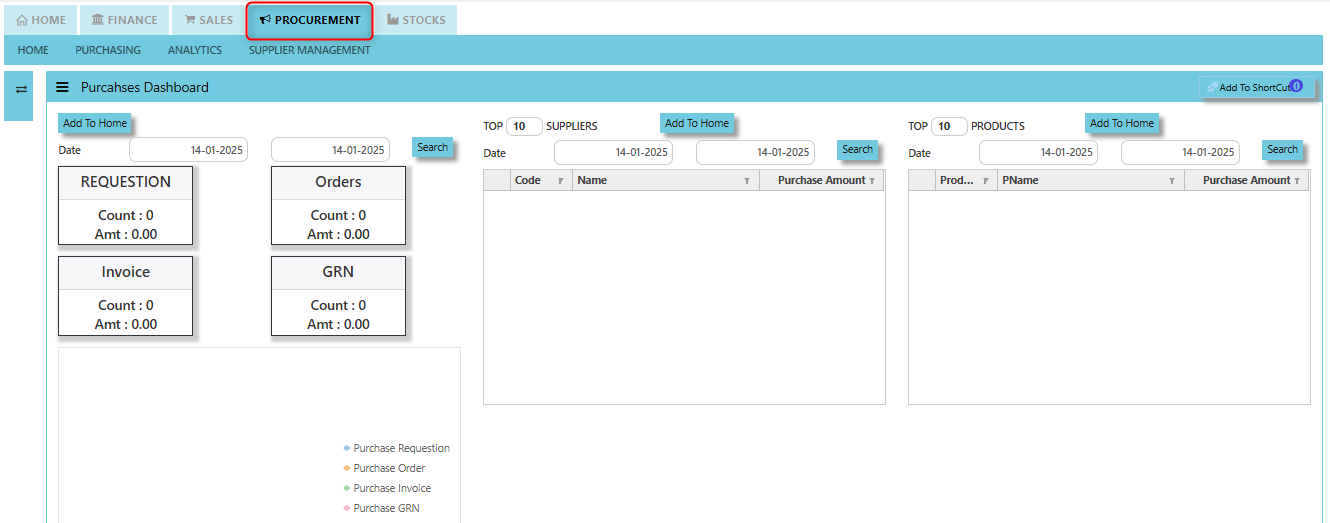
Sub-menu items of PROCUREMENT MODULE are listed below:
[](https://doc.uniq365.com/uploads/images/gallery/2025-01/XG5image.png)
**Purchase Dashboard **a visual interface that aggregates and presents key metrics, trends, and insights related to procurement activities.
The Procurement Module has 3 Sub tabs, as shown above, which are Purchasing, Analytics, and Supplier Management.
**Purchasing** is where transactions are entered, such as Supplier Purchase Order, Supplier GRN (Goods Receive Note), Supplier Invoice, Goods Return Credit and Debit Notes.
**Analytics** refers to the tools, techniques, and reports used to analyze and derive insights from the data related to procurement activities.
**Supplier Management** is where all supplier masters are created and the main settings for Purchase module are set.