# Customer Subscription Portal

##### **Uniq365 Customer's Subscription Portal** is a dedicated online platform designed for customers to manage their own subscription-related activities. With this portal, you can easily manage your account, update your subscription details, view billing information, and make changes whenever you need. To access the Customer Subscription Portal, you may go to: [https://member.uniq365.com/Membership/MemberShip/Login](https://member.uniq365.com/Membership/MemberShip/Login)

<span style="color: rgb(0, 0, 0);">Login to the membership portal using the given user ID (email address) and password.</span>

<span style="color: rgb(0, 0, 0);">[![image.png](https://doc.uniq365.com/uploads/images/gallery/2025-01/scaled-1680-/cHPimage.png)](https://doc.uniq365.com/uploads/images/gallery/2025-01/cHPimage.png)</span>

<span style="color: rgb(0, 0, 0);">If you had forgotten the password, click on FORGET PASSWORD to request a reset.</span>

<details id="bkmrk-dashboard-this-shows"><summary>DASHBOARD</summary>

##### [![image.png](https://doc.uniq365.com/uploads/images/gallery/2025-01/scaled-1680-/hsMimage.png)](https://doc.uniq365.com/uploads/images/gallery/2025-01/hsMimage.png)

<span style="color: rgb(0, 0, 0);">This shows summary of the customer's account information such as the usage, users, OCR, SMS, WhatsApp balances and other subscription that they are availing. This dashboard shows a comprehensive overview of your subscription date, expiration and usage statistics, and other important subscription-related information. It also allows you to update your information. </span>

<span style="color: rgb(0, 0, 0);">The **Service Level Agreement (SLA)** can be downloaded in this tab. A service-level agreement is an agreement between two or more parties, where one is the customer, and the others are service providers. This is to assert particular aspects of the service, quality, availability, responsibilities that are agreed between the service provider and the service user. </span>

</details><details id="bkmrk-how-to-renew-subscri"><summary>HOW TO RENEW SUBSCRIPTION?</summary>

<span style="font-size: 11pt; line-height: 107%; font-family: Calibri, 'sans-serif'; color: rgb(0, 0, 0);">You may renew your subscription any time before the subscription period ends. The system will send reminders of your due subscription 30 days, 15 days, 7 days before your expiry. Your users will also see this reminder when they log into the system. To renew you need to login under the SUBSCRIPTION ADMIN and follow the steps in the renewal process. This ADMIN is the highest authority and has the absolute access to the entire system and is the only one who can manage this subscription. </span>

<span style="font-size: 11.0pt; line-height: 107%; font-family: 'Calibri','sans-serif'; mso-ascii-theme-font: minor-latin; mso-fareast-font-family: Calibri; mso-fareast-theme-font: minor-latin; mso-hansi-theme-font: minor-latin; mso-bidi-font-family: 'Times New Roman'; mso-bidi-theme-font: minor-bidi; mso-ansi-language: EN-SG; mso-fareast-language: EN-US; mso-bidi-language: AR-SA;">[![image.png](https://doc.uniq365.com/uploads/images/gallery/2025-01/scaled-1680-/avNimage.png)](https://doc.uniq365.com/uploads/images/gallery/2025-01/avNimage.png)</span>

##### <span style="color: rgb(0, 0, 0);">**RENEW SUBSCRIPTION** </span>

**St<span style="color: rgb(0, 0, 0);">ep 1: </span>**<span style="color: rgb(0, 0, 0);">Customer Details</span>

<span style="color: rgb(0, 0, 0);">[![image.png](https://doc.uniq365.com/uploads/images/gallery/2025-01/scaled-1680-/53pimage.png)](https://doc.uniq365.com/uploads/images/gallery/2025-01/53pimage.png)</span>

<span style="color: rgb(0, 0, 0);">**Step 2:** User Details</span>

<span style="color: rgb(0, 0, 0);">In this step you can revise the number of users (Add/Reduce) If you are reducing the number of users, please deactivate the users from the respective account book(s) first. You cannot reduce the subscription users below the number of distinct users in all your account books.</span>

##### <span style="color: rgb(0, 0, 0);">**TYPE OF USERS**</span>

<p class="callout info"><span style="color: rgb(0, 0, 0); text-indent: -18pt;">When renewing the subscription, you can choose the type of User Access you want to assign your users. For users who do not need the full system, they can subscribe to the lower cost user type. There are 4 main **TYPES OF USERS** available, and they are:  
</span><span style="color: rgb(0, 0, 0);">A. **FINANCE USER**. User who are assigned this access can only access the finance tab, which comprises the General Ledger, Cash Book, Accounts Receivables and Accounts Payable module.  
</span><span style="color: rgb(0, 0, 0);">B. **OPERATIONS USER**. User who are assigned this access can only access the operational tabs, which comprises the Sales, Procurement and Inventory module  
</span><span style="color: rgb(0, 0, 0);">C. </span><span style="color: rgb(0, 0, 0);">**MOBILE USER.** User who are assigned this access can only access the system via a mobile device to run mobile sales and warehouse functions  
</span><span style="color: rgb(0, 0, 0);">D. **FULL USER.** User who are assigned this access can only access the all the tabs and modules which are accessible to FINANCE, OPERATIONS and MOBILE users.</span></p>

##### **<span style="color: rgb(0, 0, 0);">CAN I ADD/REDUCE NEW USERS AT ANYTIME?</span>**

<p class="callout success"><span style="color: rgb(0, 0, 0);">Yes, you may add any number of new users in your Subscription Plan. Any users added half-way in the subscription period will be pro-rated to the duration left till the next expiry. For example, in 3 months into your subscription period you may add a new user. This new user will be billed for only 9 months till the end of the mother-contract.</span></p>

<p class="callout danger"><span style="color: rgb(0, 0, 0);">No, you may not reduce the number of users halfway through a subscription period. You must wait till the end of subscription period and then reduce according to your needs, only during renewal.</span></p>

<span style="color: rgb(0, 0, 0);">[![image.png](https://doc.uniq365.com/uploads/images/gallery/2025-01/scaled-1680-/BcIimage.png)](https://doc.uniq365.com/uploads/images/gallery/2025-01/BcIimage.png)</span>

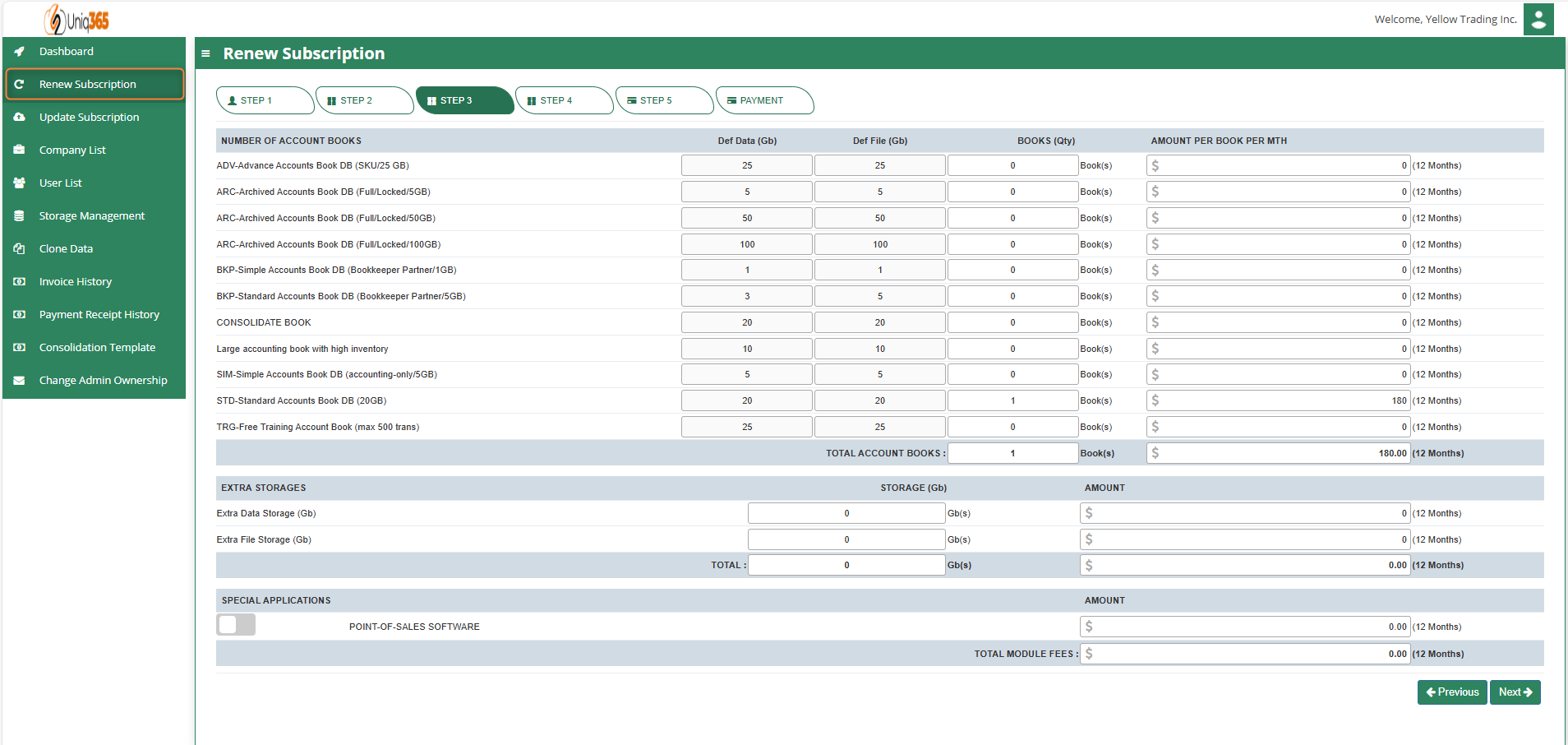
<span style="color: rgb(0, 0, 0);">**Step 3:** Account book details, Extra storage &amp; Special application if any. <span class="output-sentence" id="bkmrk-depending%C2%A0on%C2%A0the%C2%A0pac-1"><span class="MuiBox-root css-avfhld"><span id="bkmrk-depending%C2%A0on%C2%A0the%C2%A0pac-2"><span data-testid="output-sentence-0"><span class="css-1ko3g0e" id="bkmrk-depending%C2%A0on%C2%A0"><span data-testid="output-word-0-0-0"><span class="css-1g9q2al">Depending </span></span><span data-testid="output-word-0-0-1"><span class="css-1g9q2al">on </span></span></span><span class="css-1ko3g0e" id="bkmrk-the%C2%A0package%C2%A0"><span data-testid="output-word-1-0-0"><span class="css-1g9q2al">the </span></span><span data-testid="output-word-1-0-1"><span class="css-1g9q2al">package </span></span></span><span class="css-1ko3g0e" id="bkmrk-they%C2%A0have%C2%A0"><span data-testid="output-word-2-0-0"><span class="css-10o52y0">they </span></span><span data-testid="output-word-2-0-1"><span class="css-10o52y0">have </span></span></span><span class="css-1ko3g0e" id="bkmrk-selected%2C%C2%A0"><span data-testid="output-word-3-0-0"><span class="css-h5d7i9">selected, </span></span></span><span class="css-1ko3g0e" id="bkmrk-the%C2%A0details%C2%A0"><span data-testid="output-word-4-0-0"><span class="css-10o52y0">the </span></span><span data-testid="output-word-4-0-1"><span class="css-h5d7i9">details </span></span></span><span class="css-1ko3g0e" id="bkmrk-on%C2%A0"><span data-testid="output-word-5-0-0"><span class="css-10o52y0">on </span></span></span><span class="css-1ko3g0e" id="bkmrk-the%C2%A0quantity%C2%A0"><span data-testid="output-word-6-0-0"><span class="css-10o52y0">the </span></span><span data-testid="output-word-6-0-1"><span class="css-h5d7i9">quantity </span></span></span><span class="css-1ko3g0e" id="bkmrk-of%C2%A0"><span data-testid="output-word-7-0-0"><span class="css-10o52y0">of </span></span></span><span class="css-1ko3g0e" id="bkmrk-storage%C2%A0"><span data-testid="output-word-8-0-0"><span class="css-10o52y0">storage </span></span></span><span class="css-1ko3g0e" id="bkmrk-and%C2%A0"><span data-testid="output-word-9-0-0"><span class="css-10o52y0">and </span></span></span><span class="css-1ko3g0e" id="bkmrk-account%C2%A0books%C2%A0"><span data-testid="output-word-10-0-0"><span class="css-10o52y0">account </span></span><span data-testid="output-word-10-0-1"><span class="css-h5d7i9">books </span></span></span><span class="css-1ko3g0e" id="bkmrk-will%C2%A0be%C2%A0"><span data-testid="output-word-11-0-0"><span class="css-10o52y0">will </span></span><span data-testid="output-word-11-0-1"><span class="css-10o52y0">be </span></span></span><span class="css-1ko3g0e" id="bkmrk-displayed%C2%A0"><span data-testid="output-word-12-0-0"><span class="css-1tmeul0">displayed </span></span></span><span class="css-1ko3g0e" id="bkmrk-here."><span data-testid="output-word-13-0-0"><span class="css-0">here.</span></span></span></span> </span></span></span><span class="output-sentence" id="bkmrk-in%C2%A0any%C2%A0event%2C%C2%A0they%C2%A0c"><span class="MuiBox-root css-avfhld"><span id="bkmrk-in%C2%A0any%C2%A0event%2C%C2%A0they%C2%A0c-1"><span data-testid="output-sentence-1"><span class="css-1ko3g0e" id="bkmrk-in%C2%A0"><span data-testid="output-word-0-1-0"><span class="css-0">In </span></span></span><span class="css-1ko3g0e" id="bkmrk-any%C2%A0event%2C%C2%A0"><span data-testid="output-word-1-1-0"><span class="css-0">any e</span></span><span data-testid="output-word-1-1-1"><span class="css-1tmeul0">vent, </span></span></span><span class="css-1ko3g0e" id="bkmrk-they%C2%A0"><span data-testid="output-word-2-1-0"><span class="css-0">they </span></span></span><span class="css-1ko3g0e" id="bkmrk-can%C2%A0access%C2%A0"><span data-testid="output-word-3-1-0"><span class="css-10o52y0">can </span></span><span data-testid="output-word-3-1-1"><span class="css-h5d7i9">access </span></span></span><span class="css-1ko3g0e" id="bkmrk-more%C2%A0storage%C2%A0"><span data-testid="output-word-4-1-0"><span class="css-h5d7i9">more </span></span><span data-testid="output-word-4-1-1"><span class="css-10o52y0">storage </span></span></span><span class="css-1ko3g0e" id="bkmrk-if%C2%A0"><span data-testid="output-word-5-1-0"><span class="css-10o52y0">if </span></span></span><span class="css-1ko3g0e" id="bkmrk-they%27ve%C2%A0"><span data-testid="output-word-6-1-0"><span class="css-h5d7i9">they've </span></span></span><span class="css-1ko3g0e" id="bkmrk-used%C2%A0"><span data-testid="output-word-7-1-0"><span class="css-h5d7i9">used </span></span></span><span class="css-1ko3g0e" id="bkmrk-up%C2%A0"><span data-testid="output-word-8-1-0"><span class="css-h5d7i9">up </span></span></span><span class="css-1ko3g0e" id="bkmrk-all%C2%A0"><span data-testid="output-word-9-1-0"><span class="css-h5d7i9">all </span></span></span><span class="css-1ko3g0e" id="bkmrk-of%C2%A0their%C2%A0"><span data-testid="output-word-10-1-0"><span class="css-h5d7i9">of </span></span><span data-testid="output-word-10-1-1"><span class="css-10o52y0">their </span></span></span><span class="css-1ko3g0e" id="bkmrk-subscription%C2%A0"><span data-testid="output-word-11-1-0"><span class="css-h5d7i9">subscription </span></span></span><span class="css-1ko3g0e" id="bkmrk-storage-by-modifying"><span data-testid="output-word-12-1-0"><span class="css-0">storage by modifying the desired add ons on this step.</span></span></span></span></span></span></span></span>

<span style="color: rgb(0, 0, 0);">[![image.png](https://doc.uniq365.com/uploads/images/gallery/2025-01/scaled-1680-/BMQimage.png)](https://doc.uniq365.com/uploads/images/gallery/2025-01/BMQimage.png)</span>

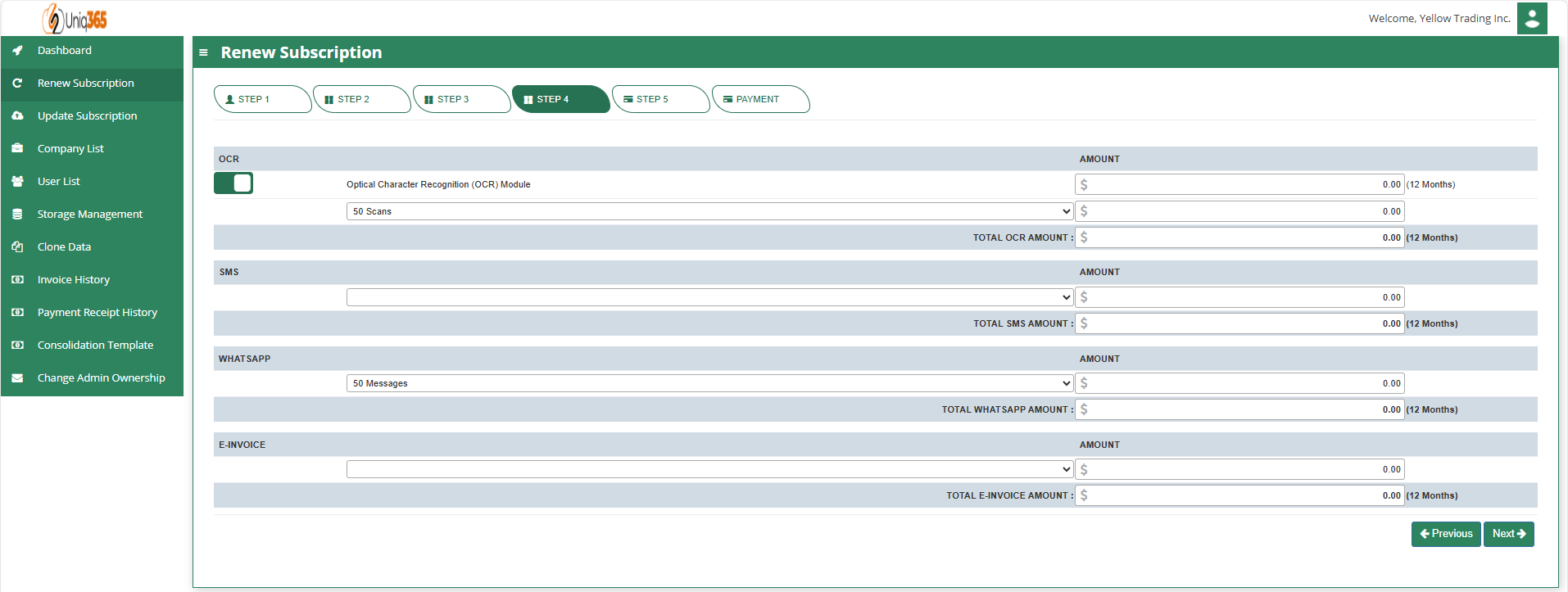
**<span style="color: rgb(0, 0, 0);"><span style="font-family: 'Calibri','sans-serif'; mso-ascii-theme-font: minor-latin; mso-hansi-theme-font: minor-latin; mso-bidi-font-family: 'Times New Roman'; mso-bidi-theme-font: minor-bidi;"> </span></span>**<span style="color: rgb(0, 0, 0);">**Step 4**: OCR, SMS, WhatsApp And E-Invoice Limit. </span>

<span style="color: rgb(0, 0, 0);">Any excess of usage in the package that the customer availed it will be subject to corresponding charges.</span>

<span style="color: rgb(0, 0, 0);">[![image.png](https://doc.uniq365.com/uploads/images/gallery/2025-01/scaled-1680-/gb3image.png)](https://doc.uniq365.com/uploads/images/gallery/2025-01/gb3image.png)</span>

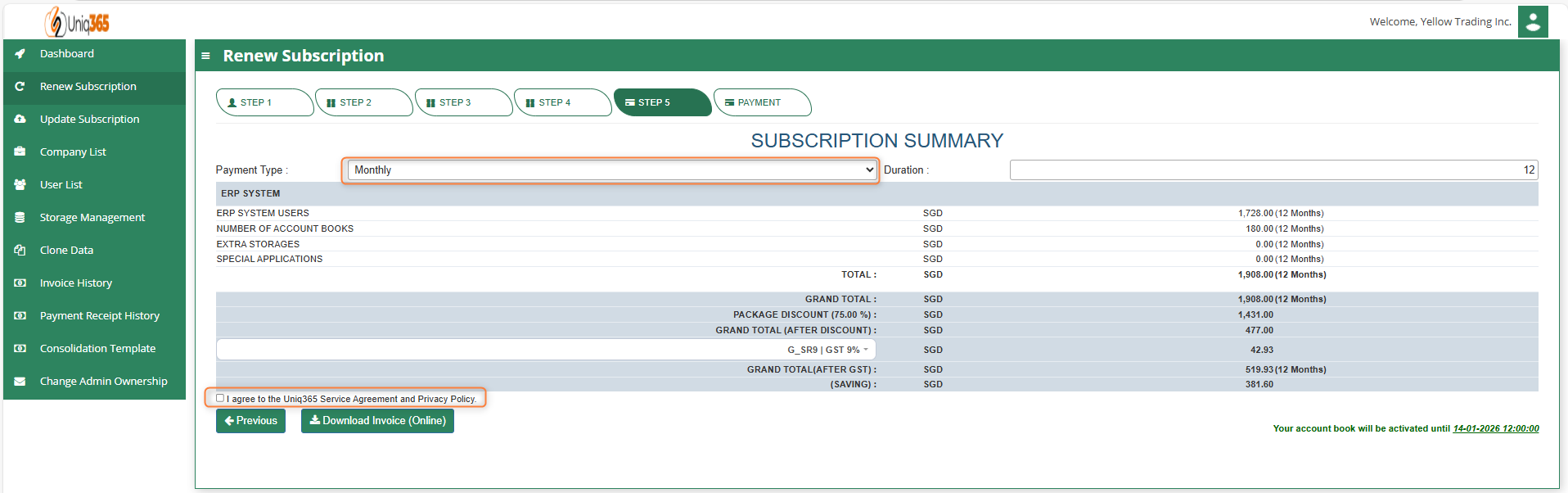
<span style="color: rgb(0, 0, 0);">**Step 5:** Subscription Summary</span><span style="color: rgb(0, 0, 0);">-</span>

- <span style="color: rgb(0, 0, 0);">Select the payment type</span>
- <span style="color: rgb(0, 0, 0);">Agree the A2000ERP Service Agreement &amp; Privacy Policy before renewing.  
    - For renewal - use Credit Card or PayNow.  
    - You will be redirected to the payment gateway to make payment</span>
- <span style="color: rgb(0, 0, 0);">Once renewed, you can download the Invoice from the Invoice history and can see the revised expiry date from the Dashboard.</span>

</details><details id="bkmrk-update-subscription-"><summary>UPDATE SUBSCRIPTION</summary>

<span style="color: rgb(0, 0, 0);"><span style="font-size: 12.0pt; line-height: 107%; font-family: 'Calibri','sans-serif'; mso-ascii-theme-font: minor-latin; mso-fareast-font-family: Calibri; mso-fareast-theme-font: minor-latin; mso-hansi-theme-font: minor-latin; mso-bidi-font-family: 'Times New Roman'; mso-bidi-theme-font: minor-bidi; mso-ansi-language: EN-SG; mso-fareast-language: EN-US; mso-bidi-language: AR-SA;">The process for updating a subscription is similar to the renewal process but focuses on making specific changes to the existing plan rather than simply renewing it. This allows customers to add services according to their current needs. The update process typically involves logging into the account, selecting the desired changes, reviewing the impact on pricing and billing, confirming the changes, and processing any necessary payments.</span></span>

</details>
<details id="bkmrk-company-list-under-c"><summary>COMPANY LIST</summary>

[![image.png](https://doc.uniq365.com/uploads/images/gallery/2025-01/scaled-1680-/05limage.png)](https://doc.uniq365.com/uploads/images/gallery/2025-01/05limage.png)

<span style="color: rgb(0, 0, 0);">Under company list, the Company Name, Email, Phone, Data Usage and File Usage can be viewed. You may double click to edit the company info. </span>

<span style="color: rgb(0, 0, 0);">[![image.png](https://doc.uniq365.com/uploads/images/gallery/2025-01/scaled-1680-/dnPimage.png)](https://doc.uniq365.com/uploads/images/gallery/2025-01/dnPimage.png)</span>

<span style="color: rgb(0, 0, 0);">[![image.png](https://doc.uniq365.com/uploads/images/gallery/2025-01/scaled-1680-/DwVimage.png)](https://doc.uniq365.com/uploads/images/gallery/2025-01/DwVimage.png)</span>

<span style="color: rgb(0, 0, 0);">Under Company List, Users you can update the password. Just double click to individually modify the password for the account book.</span>

</details><details id="bkmrk-user-list-all-the-us"><summary>USER LIST</summary>

<span style="color: rgb(0, 0, 0);">[![image.png](https://doc.uniq365.com/uploads/images/gallery/2025-01/scaled-1680-/nLcimage.png)](https://doc.uniq365.com/uploads/images/gallery/2025-01/nLcimage.png)</span>

<span style="color: rgb(0, 0, 0);">All the users can be viewed in this list. Using the reset password under user list, the customer will be able to mass update the password in all of the company. If you want to change one company only you can utilize company list reset password.</span>

</details><details id="bkmrk-storage-management-d"><summary>STORAGE MANAGEMENT</summary>


<span style="color: rgb(0, 0, 0);">[![image.png](https://doc.uniq365.com/uploads/images/gallery/2025-01/scaled-1680-/qedimage.png)](https://doc.uniq365.com/uploads/images/gallery/2025-01/qedimage.png)</span>

<span style="color: rgb(0, 0, 0);">**Default Storage.** refers to the standard amount of storage provided as part of your subscription plan. This storage typically covers the core data needs of the organization, including essential transactional records, financial data, and operational information, with a set limit on the volume of data that can be stored.</span>

<span style="color: rgb(0, 0, 0);">**Extra Storage.** refers to the additional space allocated to accommodate growing data requirements This extra storage is essential for handling increased volumes of transactional data, historical records, backups, and the addition of new modules or business units within the ERP system. It helps ensure that the system can continue to function efficiently without running out of space, preventing potential data loss, system slowdowns, or disruptions.</span>

<span style="color: rgb(0, 0, 0);">**Used Storage.** Refers to the amount of data space occupied by the various modules and records within the system, including transactional data, financial records, inventory details, customer information, and employee data. This storage contains sales orders, invoices, and product catalogs, as well as like logs, reports, and system backups.</span>

</details><details id="bkmrk-clone-data-under-clo"><summary>CLONE DATA</summary>

<span style="color: rgb(0, 0, 0);">[![image.png](https://doc.uniq365.com/uploads/images/gallery/2025-01/scaled-1680-/Hrjimage.png)](https://doc.uniq365.com/uploads/images/gallery/2025-01/Hrjimage.png)</span>

<span style="color: rgb(0, 0, 0);">Under Clone Data tab, customer can replicate and manage a data from sourcebook to destination account book. It helps businesses to clone Customer/Supplier, Product, Chart of Account, Warehouse, and other data to streamline financial operations, from recording transactions to generating financial reports.</span>

<span style="color: rgb(0, 0, 0);">[![image.png](https://doc.uniq365.com/uploads/images/gallery/2025-01/scaled-1680-/rxJimage.png)](https://doc.uniq365.com/uploads/images/gallery/2025-01/rxJimage.png)</span>

<span style="color: rgb(0, 0, 0);">**Step 1:** Select a source account book, this is where the base account book.</span>

[![image.png](https://doc.uniq365.com/uploads/images/gallery/2025-01/scaled-1680-/puvimage.png)](https://doc.uniq365.com/uploads/images/gallery/2025-01/puvimage.png)

<span style="color: black;">**S<span style="color: rgb(0, 0, 0);">tep 2:</span>**<span style="color: rgb(0, 0, 0);"> Select a destination account book. </span></span>

<span style="color: rgb(0, 0, 0);">**Step 3:** Choose from the data tab information you want to clone</span>

<span style="color: rgb(0, 0, 0);">**Step 4:** Once finalized the data for cloning, hit Clone.</span>

##### <span style="color: rgb(0, 0, 0);">**INVOICE HISTORY**</span>

<span style="color: rgb(0, 0, 0);">[![image.png](https://doc.uniq365.com/uploads/images/gallery/2025-01/scaled-1680-/C4wimage.png)](https://doc.uniq365.com/uploads/images/gallery/2025-01/C4wimage.png)</span>

<span style="color: rgb(0, 0, 0);">Invoice history provides a comprehensive view of all transactions of the customer may it be subscription, renewal or availing additional subscription. Customer can view their invoice and print using this tab.</span>

<span style="color: rgb(0, 0, 0);">[![image.png](https://doc.uniq365.com/uploads/images/gallery/2025-01/scaled-1680-/Yzfimage.png)](https://doc.uniq365.com/uploads/images/gallery/2025-01/Yzfimage.png)</span>

Click download invoice and it will be downloaded to your device.

[![image.png](https://doc.uniq365.com/uploads/images/gallery/2025-01/scaled-1680-/Ejrimage.png)](https://doc.uniq365.com/uploads/images/gallery/2025-01/Ejrimage.png)

<span style="color: rgb(0, 0, 0);">Once you click Pay, you will be redirected to the payment gateway to make payment.</span>

</details><details id="bkmrk-payment-review-histo"><summary>PAYMENT REVIEW HISTORY</summary>

[![image.png](https://doc.uniq365.com/uploads/images/gallery/2025-01/scaled-1680-/SCKimage.png)](https://doc.uniq365.com/uploads/images/gallery/2025-01/SCKimage.png)

<span style="color: rgb(0, 0, 0);">Once the payment has been processed, it will reflect in the payment history.</span>

</details><details id="bkmrk-change-admin-ownersh"><summary>CHANGE ADMIN OWNERSHIP</summary>

<span style="color: rgb(0, 0, 0);">[![image.png](https://doc.uniq365.com/uploads/images/gallery/2025-01/scaled-1680-/svMimage.png)](https://doc.uniq365.com/uploads/images/gallery/2025-01/svMimage.png)</span>

<span style="color: rgb(0, 0, 0);">If there is change in ownership customer can modify the email address in the Change Admin Ownership tab so that new admin will be recognized by the system.</span>

</details>