# Customer Portal - Renew Subscription

#### Renew Subscription is where the UNIQ365 Customers can process their Monthly, Yearly Renewal. They have the option to configure their desired number of User Types and classification, No of Books to Configure and enable other custom functionality.

\_\_\_\_\_\_\_\_\_\_\_\_\_\_\_\_\_\_\_\_\_\_\_\_\_\_\_\_\_\_\_\_\_\_\_\_\_\_\_\_\_\_\_\_\_\_\_\_\_\_\_\_\_\_\_\_\_\_\_\_\_\_\_\_\_\_\_\_\_\_\_\_\_\_\_\_\_\_\_\_\_\_\_\_\_\_\_\_\_\_\_\_\_\_\_\_\_\_\_\_\_\_\_\_\_\_\_\_\_\_\_\_\_\_\_\_\_\_\_\_\_\_\_\_\_\_\_\_\_\_\_\_\_\_\_\_\_\_\_\_\_\_\_\_

<span style="color: rgb(53, 152, 219);">**1. STEP 1, CUSTOMER DETAILS** </span><span style="color: rgb(53, 152, 219);"><span style="color: rgb(0, 0, 0);">It shows the primary Customer Details such as User Code, Given Name, Email, Phone No, Company and Package Selection.  
</span></span> [![image.png](https://doc.uniq365.com/uploads/images/gallery/2025-03/scaled-1680-/evBimage.png)](https://doc.uniq365.com/uploads/images/gallery/2025-03/evBimage.png)

<span style="color: rgb(53, 152, 219);">**2. STEP 2, USER TYPE DETAILS** <span style="color: rgb(0, 0, 0);">In this step you can revise the number of users (Add/Reduce) If you are reducing the number of users, please deactivate the users from the respective account book(s) first. You cannot reduce the subscription users below the number of distinct users in all your account books.</span>  
</span>

[![image.png](https://doc.uniq365.com/uploads/images/gallery/2025-03/scaled-1680-/amcimage.png)](https://doc.uniq365.com/uploads/images/gallery/2025-03/amcimage.png)

**TYPES OF USERS**

- **FINANCE USER**. User who are assigned this access can only access the finance tab, which comprises the General Ledger, Cash Book, Accounts Receivables and Accounts Payable module.
- **OPERATIONS USER**. User who are assigned this access can only access the operational tabs, which comprises the Sales, Procurement and Inventory module.
- **MOBILE USER**. User who are assigned this access can only access the system via a mobile device to run mobile sales and warehouse functions.
- **FULL USER.** User who are assigned this access can only access the all the tabs and modules which are accessible to FINANCE, OPERATIONS and MOBILE users
- 

<p class="callout info">CAN I ADD/REDUCE NEW USERS AT ANYTIME? </p>

<p class="callout success">Yes, you may add any number of new users in your Subscription Plan. Any users added half-way in the subscription period will be pro-rated to the duration left till the next expiry. For example, in 3 months into your subscription period you may add a new user. This new user will be billed for only 9 months till the end of the mother-contract</p>

<p class="callout warning"> No, you may not reduce the number of users halfway through a subscription period. You must wait till the end of subscription period and then reduce according to your needs, only during renewal.</p>

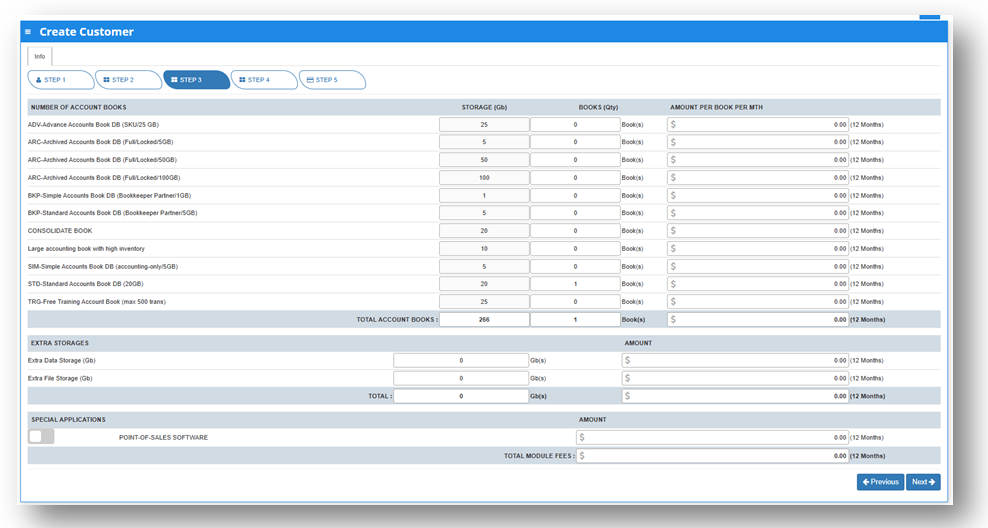
<span style="color: rgb(53, 152, 219);">**3. STEP 3, ACCOUNTBOOK DETAILS, EXTRA STORAGE &amp; SPECIAL APPLICATION(CUSTOMIZATION)**</span>

<span class="output-sentence" id="bkmrk-depending%C2%A0on%C2%A0the%C2%A0pac-1"><span class="MuiBox-root css-avfhld"><span id="bkmrk-depending%C2%A0on%C2%A0the%C2%A0pac-2"><span data-testid="output-sentence-0"><span class="css-1ko3g0e" id="bkmrk-depending%C2%A0on%C2%A0"><span data-testid="output-word-0-0-0"><span class="css-1g9q2al">Depending </span></span><span data-testid="output-word-0-0-1"><span class="css-1g9q2al">on </span></span></span><span class="css-1ko3g0e" id="bkmrk-the%C2%A0package%C2%A0"><span data-testid="output-word-1-0-0"><span class="css-1g9q2al">the </span></span><span data-testid="output-word-1-0-1"><span class="css-1g9q2al">package </span></span></span><span class="css-1ko3g0e" id="bkmrk-they%C2%A0have%C2%A0"><span data-testid="output-word-2-0-0"><span class="css-10o52y0">they </span></span><span data-testid="output-word-2-0-1"><span class="css-10o52y0">have </span></span></span><span class="css-1ko3g0e" id="bkmrk-selected%2C%C2%A0"><span data-testid="output-word-3-0-0"><span class="css-h5d7i9">selected, </span></span></span><span class="css-1ko3g0e" id="bkmrk-the%C2%A0details%C2%A0"><span data-testid="output-word-4-0-0"><span class="css-10o52y0">the </span></span><span data-testid="output-word-4-0-1"><span class="css-h5d7i9">details </span></span></span><span class="css-1ko3g0e" id="bkmrk-on%C2%A0"><span data-testid="output-word-5-0-0"><span class="css-10o52y0">on </span></span></span><span class="css-1ko3g0e" id="bkmrk-the%C2%A0quantity%C2%A0"><span data-testid="output-word-6-0-0"><span class="css-10o52y0">the </span></span><span data-testid="output-word-6-0-1"><span class="css-h5d7i9">quantity </span></span></span><span class="css-1ko3g0e" id="bkmrk-of%C2%A0"><span data-testid="output-word-7-0-0"><span class="css-10o52y0">of </span></span></span><span class="css-1ko3g0e" id="bkmrk-storage%C2%A0"><span data-testid="output-word-8-0-0"><span class="css-10o52y0">storage </span></span></span><span class="css-1ko3g0e" id="bkmrk-and%C2%A0"><span data-testid="output-word-9-0-0"><span class="css-10o52y0">and </span></span></span><span class="css-1ko3g0e" id="bkmrk-account%C2%A0books%C2%A0"><span data-testid="output-word-10-0-0"><span class="css-10o52y0">account </span></span><span data-testid="output-word-10-0-1"><span class="css-h5d7i9">books </span></span></span><span class="css-1ko3g0e" id="bkmrk-will%C2%A0be%C2%A0"><span data-testid="output-word-11-0-0"><span class="css-10o52y0">will </span></span><span data-testid="output-word-11-0-1"><span class="css-10o52y0">be </span></span></span><span class="css-1ko3g0e" id="bkmrk-displayed%C2%A0"><span data-testid="output-word-12-0-0"><span class="css-1tmeul0">displayed </span></span></span><span class="css-1ko3g0e" id="bkmrk-here."><span data-testid="output-word-13-0-0"><span class="css-0">here.</span></span></span></span>   
</span></span></span><span class="output-sentence" id="bkmrk-in%C2%A0any%C2%A0event%2C%C2%A0they%C2%A0c"><span class="MuiBox-root css-avfhld"><span id="bkmrk-in%C2%A0any%C2%A0event%2C%C2%A0they%C2%A0c-1"><span data-testid="output-sentence-1"><span class="css-1ko3g0e" id="bkmrk-in%C2%A0"><span data-testid="output-word-0-1-0"><span class="css-0">In </span></span></span><span class="css-1ko3g0e" id="bkmrk-any%C2%A0event%2C%C2%A0"><span data-testid="output-word-1-1-0"><span class="css-0">any </span></span><span data-testid="output-word-1-1-1"><span class="css-1tmeul0">event, </span></span></span><span class="css-1ko3g0e" id="bkmrk-they%C2%A0"><span data-testid="output-word-2-1-0"><span class="css-0">they </span></span></span><span class="css-1ko3g0e" id="bkmrk-can%C2%A0access%C2%A0"><span data-testid="output-word-3-1-0"><span class="css-10o52y0">can </span></span><span data-testid="output-word-3-1-1"><span class="css-h5d7i9">access </span></span></span><span class="css-1ko3g0e" id="bkmrk-more%C2%A0storage%C2%A0"><span data-testid="output-word-4-1-0"><span class="css-h5d7i9">more </span></span><span data-testid="output-word-4-1-1"><span class="css-10o52y0">storage </span></span></span><span class="css-1ko3g0e" id="bkmrk-if%C2%A0"><span data-testid="output-word-5-1-0"><span class="css-10o52y0">if </span></span></span><span class="css-1ko3g0e" id="bkmrk-they%27ve%C2%A0"><span data-testid="output-word-6-1-0"><span class="css-h5d7i9">they've </span></span></span><span class="css-1ko3g0e" id="bkmrk-used%C2%A0"><span data-testid="output-word-7-1-0"><span class="css-h5d7i9">used </span></span></span><span class="css-1ko3g0e" id="bkmrk-up%C2%A0"><span data-testid="output-word-8-1-0"><span class="css-h5d7i9">up </span></span></span><span class="css-1ko3g0e" id="bkmrk-all%C2%A0"><span data-testid="output-word-9-1-0"><span class="css-h5d7i9">all </span></span></span><span class="css-1ko3g0e" id="bkmrk-of%C2%A0their%C2%A0"><span data-testid="output-word-10-1-0"><span class="css-h5d7i9">of </span></span><span data-testid="output-word-10-1-1"><span class="css-10o52y0">their </span></span></span><span class="css-1ko3g0e" id="bkmrk-subscription%C2%A0"><span data-testid="output-word-11-1-0"><span class="css-h5d7i9">subscription </span></span></span></span></span></span></span><span class="output-sentence" id="bkmrk-storage-by-modifying"><span class="MuiBox-root css-avfhld"><span id="bkmrk-storage-by-modifying-1"><span data-testid="output-sentence-1"><span class="css-1ko3g0e" id="bkmrk-storage-by-modifying-2"><span data-testid="output-word-12-1-0"><span class="css-0">storage by modifying the desired add-ons for this steps.</span></span></span></span></span></span></span>

<span class="output-sentence" id="bkmrk-%C2%A0-1"><span class="MuiBox-root css-avfhld"><span id="bkmrk-%C2%A0-2"><span data-testid="output-sentence-1"><span class="css-1ko3g0e" id="bkmrk-%C2%A0-3"><span data-testid="output-word-12-1-0"><span class="css-0"> </span></span></span></span></span></span></span>[![image.png](https://doc.uniq365.com/uploads/images/gallery/2025-03/scaled-1680-/RKyimage.png)](https://doc.uniq365.com/uploads/images/gallery/2025-03/RKyimage.png)

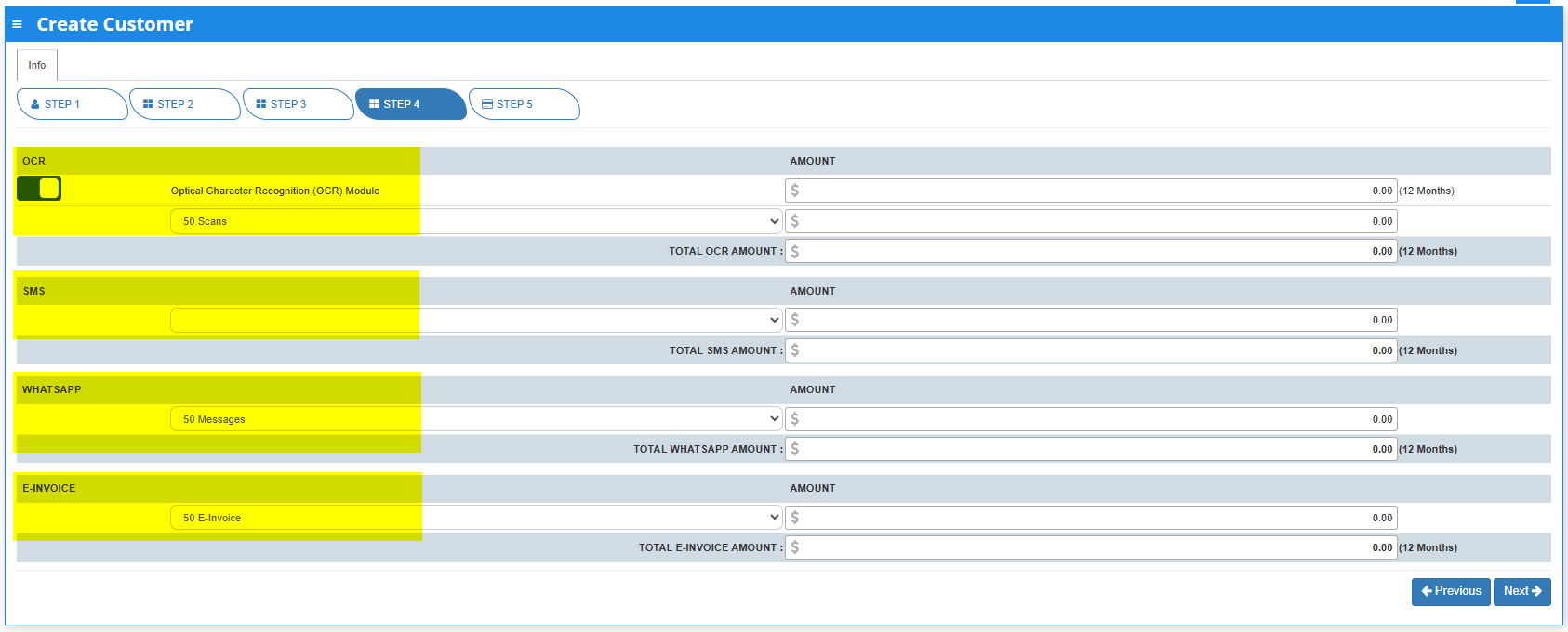
**<span style="color: rgb(53, 152, 219);">4. STEP 4,OCR, SMS, WHATSAPP AND E-INVOICE LIMIT</span>**

Any excess of usage in the package that the customer availed it will be subject to corresponding charges.

[![image.png](https://doc.uniq365.com/uploads/images/gallery/2025-03/scaled-1680-/saNimage.png)](https://doc.uniq365.com/uploads/images/gallery/2025-03/saNimage.png)
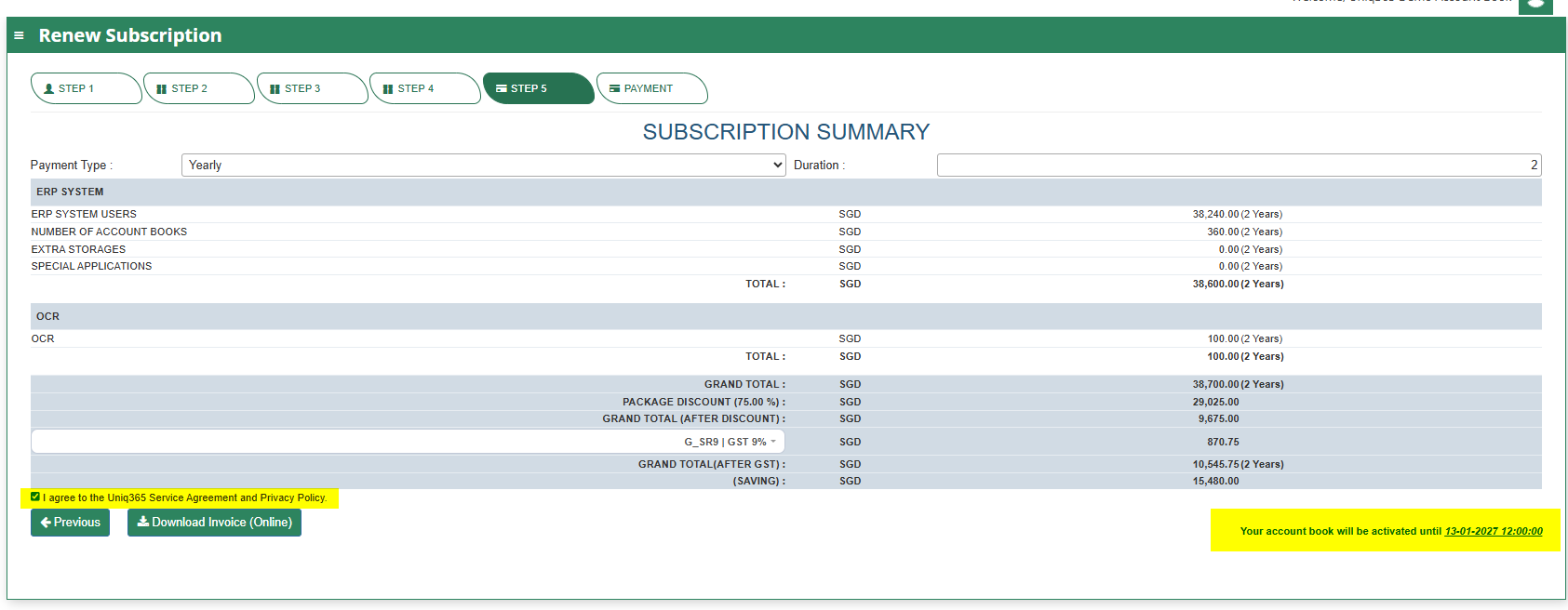
<span style="color: rgb(53, 152, 219);">**5. Step 5, SUBSCRIPTION SUMMARY** <span style="color: rgb(0, 0, 0);">The Subscription Summary will give you an overview of the Summary Payment from Total Number of Users, Total Number of Accountbook, Total Storages and Summary of Special Applications including OCR.</span></span>

- <span style="color: rgb(53, 152, 219);"><span style="color: rgb(0, 0, 0);">Payment Type will be classified by Monthly and Yearly as an Option which includes identification of Duration.  
    </span></span>
- <span style="color: rgb(53, 152, 219);"><span style="color: rgb(0, 0, 0);">Once all are in place and countercheck, the user needs to agree with the **Uniq365**</span></span> **Service Agreement &amp; Privacy Policy** before renewing.
- An indication of the validity timeline of the renewal is also indicated on the below right most part of the user interface.

[![image.png](https://doc.uniq365.com/uploads/images/gallery/2025-03/scaled-1680-/zLaimage.png)](https://doc.uniq365.com/uploads/images/gallery/2025-03/zLaimage.png)
6\. STEP 6, PAYMENT  
Renewal Payment Option via CREDIT CARD or PAYNOW.